Straight Desk vs Corner Desk for a Home Office: Which Is Better? (October 2026)
Choose a straight desk for an open wall and a corner desk to make use of a room corner. Straight desk vs corner desk comes down to your wall space, equipment, storage needs and how much floor area you want to keep open.
On this page (8 sections)
- Straight desk vs corner desk: which shape fits your room?
- Which shape gives you a more useful work surface?
- Which desk is easier to keep organized?
- How should you compare chair and leg space?
- How do you measure before buying?
- How should you set up a straight or corner desk?
- What common desk-shape mistakes should you avoid?
- Which desk should you choose for a home office?
Straight desk vs corner desk comes down to the shape of your available space and the way you work. Choose a straight desk for one clear wall and a continuous work surface; choose a corner desk when the corner is the natural place for your setup or you want separate work zones.
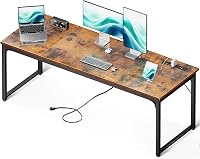
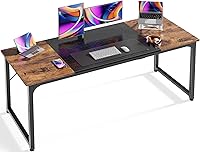
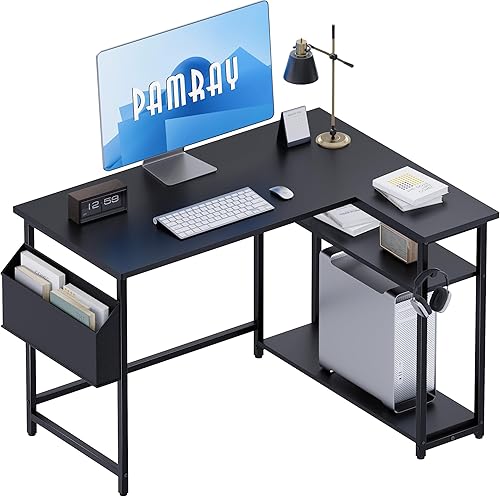
The PRAISUN is a 63 in wide rectangular desk with a 23.6 in depth. The Pamray has an L-shaped top with reversible side shelves, while the SEDETA has a triangular desktop with a drawer and open shelves.
Measure the room before comparing desk tops. Include the chair, walking path and equipment in your plan, since the desk has to work as part of the whole room.

Straight desk vs corner desk: which shape fits your room?
A straight desk fits along one wall; a corner desk uses space along two walls or where they meet. The best fit depends on the usable wall length, the desk footprint and the open floor area you want to preserve.
A straight desk can work in an office, bedroom or shared room with a long wall. It leaves the adjoining wall free for a bookcase, bed or another use.
That can be a useful trade when the room needs a clear route through its center.
A corner desk can make an awkward corner useful, but it may occupy floor space along both adjoining walls. Check the depth as well as the width: a desk can sit neatly in the corner and still project too far into the room.
Before buying, mark the intended outline on the floor with painter's tape. Sit where the chair would go and check doors, closets, drawers and outlets.
How does a straight desk work near a corner?
A straight desk can sit against one wall near a corner if the wall is long enough and the chair has space to move. It doesn't extend along the second wall, leaving that side available for another purpose.
The PRAISUN's 63 in width needs a long, clear wall section. Its 23.6 in depth makes it worth checking where the chair and desk will sit in relation to the rest of the room.
If your open wall is shorter, compare common sizes in our computer desk widths guide. It can help you decide how much of the wall to reserve before comparing shapes.
What should you check before choosing a corner desk?
A corner desk needs clear space in the corner and enough room on both sides for its top and supports. An L-shaped top and a triangular top use that space differently, so measure both walls and compare the actual outline.
The Pamray measures 39.3 x 27.5 x 29.2 in. Its shelves can go on the left or right, so settle on a side that suits the room before assembly.
The SEDETA measures 44.5 in wide and 31.5 in deep. Its triangular top is intended for a corner, with a drawer and open shelves beneath it.
Don't assume that a corner desk saves space simply because it uses a corner. Measure how far the front edge reaches into the room, and leave room to sit down and move around it.
Which shape gives you a more useful work surface?
Choose the shape that keeps your main tools in reach without crowding your chair. A straight desk puts equipment in one row; a corner desk can split equipment or tasks across connected surfaces.
The PRAISUN's broad rectangular top can suit a setup that needs a long row of equipment along one wall. The PRAISUN desk is one option to consider if you need space for several monitors and other desk gear.
With an L-shaped desk, you can use one side for a computer and the other for papers, a printer or another task. That arrangement can make it easier to leave work materials out without placing everything in one line.
A triangular top faces into the room from the corner rather than reaching along two rectangular wings. The SEDETA's drawer and shelves give small supplies a place to go, which can leave more of its desktop clear.
Which shape works better for monitors and a keyboard?
A straight desk suits a side-by-side monitor row, while an L-shaped desk can separate work zones. Check the usable width and depth against the full setup, including stands, keyboard, mouse and the space your arms need.
Measure equipment at its widest points. Include the keyboard and mouse area in front of the monitors, not just the space occupied by the screens.
Monitor stands or arms can change how much desktop you need, and monitor placement affects how much space remains for writing. For more help estimating usable surface area, see how deep and wide a computer desk should be.
Which desk is easier to keep organized?
A straight desk keeps equipment in one row, while corner desks can add storage or separate tasks by zone. Make a short plan for where each item will go before choosing a shape.
The PRAISUN has an open rectangular top and a metal frame, without built-in drawers or shelves. It suits someone who wants a clear desktop and already has another place for supplies.
The Pamray has two height-adjustable open shelves and a hook. Its reversible shelf position provides a choice of which side holds supplies or a hanging bag.
The SEDETA includes a drawer and lower open shelves. Those can hold smaller items and books, though the triangular top arranges equipment differently from a straight rectangular surface.
Cables are part of the layout too. Our guide to hiding cables on a computer desk explains how to plan cable routes around a workstation.
How should you compare chair and leg space?
Check the supports, shelves and chair position before settling on a desk. A desk can fit the room but still feel awkward if a support or storage section blocks where you sit.
A straight desk gives you one front edge for the chair. Check the open space beneath it against your chair width, sitting position and anything you plan to store there.
With an L-shaped desk, decide which side will face your chair and which side will hold equipment or storage. The Pamray's reversible shelves offer a left or right arrangement, so plan that orientation before you assemble it.
A triangular desk changes the distance between you and each side of the top. Mark the front edge with tape and sit in the planned position to see whether the surfaces feel within comfortable reach.
How do you measure before buying?
Measure the walls, desk outline, chair movement and delivery route before choosing either shape. These checks catch fit problems that the desk's main dimensions alone won't show.
For a straight desk, record the usable wall length and note outlets, windows, baseboards and doors. For a corner desk, measure both walls from the corner and check where supports, shelves or drawers will sit.
Mark the desktop outline on the floor, then add space for the chair to slide back. Walk through the room and check that the desk doesn't block a closet, doorway or route you use often.
Also measure the largest parts through the delivery route, including hallways, stair turns and door openings. Set aside enough room to assemble the desk, and follow the instructions for the specific model.
If you want a wider work area, our guide to large computer desks covers options built around longer tops. If two people need to share the space, see two-person computer desks before choosing a corner setup.
How should you set up a straight or corner desk?
Place the desk so your screen, chair and frequently used items fit the planned work zone. Set the position first, then arrange equipment around how you reach and move.
For a straight desk, center the setup on the usable part of the wall rather than the wall's total length. Keep the monitor and keyboard aligned with your chair, and leave clear space for any work that needs the desktop.
For an L-shaped desk, assign a purpose to each side before placing equipment. For example, one side can hold the computer and the other can hold papers or supplies; this helps keep the central work area from becoming a storage pile.
For a triangular corner desk, keep the items you use most often within easy reach of your chair. Put supplies that you need less often in the drawer or lower shelves, while keeping the main surface available for the current task.
Follow the assembly instructions and tighten the desk's connections as directed. If the floor is uneven, adjust the feet where the design allows it, then check that the desk sits level before setting up equipment.
What common desk-shape mistakes should you avoid?
The biggest mistake is choosing by desktop area alone. A desk also needs room for a chair, a clear path and equipment arranged in a way that suits your work.
Don't measure only the wall. Include desk depth, chair movement and the space needed to walk behind or beside the chair.
Don't assume all corner desks offer the same usable surface. An L shape creates two connected work zones, while a triangular top points the work area toward the room.
Don't choose a shelf side after you start assembling a reversible desk. Decide which way it should face based on the corner, chair position and items that need storage.
Finally, don't fill every available surface on day one. Start with your main equipment, leave room for the way you work, and add only the storage you need.
Which desk should you choose for a home office?
Pick a straight desk if you have one open wall and want a long, continuous work surface; pick a corner desk if the corner is the best place to work or you want separate work zones. Use the measurements and equipment plan to make the final choice.
Choose the PRAISUN when your wall can accommodate its 63 in width, you want a rectangular top, and built-in storage is not a priority. Skip it if you don't have the wall length or prefer shelves and drawers attached to the desk.
Choose the Pamray when an L-shaped layout suits the corner and adjustable shelves would help organize supplies. Its reversible shelves give you a left or right setup, but measure both sides and decide on their position before assembly.
Choose the SEDETA when a triangular corner shape and built-in storage suit your room. Its drawer and open shelves may help keep supplies off the desktop, but the 31.5 in height and 31.5 in depth should fit your needs and room.
For another way to compare desk types, read our computer workstation desk buying guide. Straight desk vs corner desk is ultimately a choice between one open wall and a work area built around a corner, so let your room and daily setup make the call.
Frequently asked questions
Is a straight desk or corner desk better for a small room?
A corner desk can use space where two walls meet, while a straight desk can be easier to place along one open wall. Compare the footprint and chair area, then check that doors, drawers and walking paths remain clear.
A corner shape still needs room for both sides of its top.
Does a corner desk give you more workspace?
It can add a second work surface within a corner layout. Usable space depends on the top shape and depth.
An L-shaped desk and a triangular desk arrange that surface differently.
Compare the dimensions with your monitor, keyboard, mouse and any work materials.
Can you put a straight desk in a corner?
Yes. A straight desk can sit along one wall near a corner if there is enough wall length and chair clearance.
It won't wrap around the second wall, so that area can remain open for another use.
Check doors, outlets and walking paths before placing it.
Which desk shape works better for multiple monitors?
Either shape can work if its usable surface fits your monitors, stands and keyboard. A wide straight desk gives you one continuous row, while a corner desk can spread equipment across two sides.
Measure the full setup and leave room for a mouse and your arms.
How do you measure for a corner desk?
Measure both walls from the corner, then mark the desk's outline on the floor with tape. Include chair movement, door swings and walking space.
For an L-shaped desk, check each side and where shelves or supports will sit, then confirm the path for bringing parts into the room.