What Computer Desk Fits Three Monitors?
A computer desk for 3 monitors needs enough room for the screens, keyboard, and mouse, plus a surface that fits their stands or mount. Measure the full setup before choosing a straight or L-shaped desk.
On this page (7 sections)
- How wide should a computer desk for 3 monitors be?
- Does an L-shaped desk work for a three-monitor setup?
- Can a triple monitor stand save desk space?
- How deep should a desk be for three monitors?
- What should you measure before buying?
- How do you set up and care for a three-monitor desk?
- Which setup should you choose?
A computer desk for 3 monitors needs enough room for the screens, keyboard, and mouse, plus a surface that fits their stands or mount. Measure the screens in their planned positions, including any angles, then leave room for the gear you use every day.
A long straight desk can keep the screens in one row, while an L-shaped desk gives you another surface for notes or equipment. A triple monitor stand or mount can open up desk space, but check its base or clamp requirements before choosing a desk.
How wide should a computer desk for 3 monitors be?
Measure the combined width of the three screens in the layout you plan to use. Include the gaps between screens, angled edges, and the space taken by bases or a mount.
Screen size alone doesn't tell you the full width. Two setups with the same screens can use different amounts of space if one keeps the displays straight and the other angles the outer screens toward you.
Leave usable space in front of the screens for your keyboard and mouse. If you also need speakers, a notebook, or a docking station, include those in your sketch before settling on a desk.
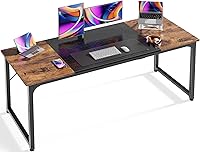
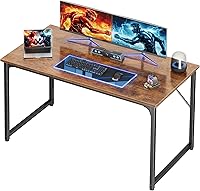
The Coleshome desk has a 70.9 in wide by 23.6 in deep surface. It suits a straight row if your measured layout, work gear, and room fit those dimensions.
Measure the desk surface, not just the screen edges. A tape outline on the floor can help you see how much room the desk takes up, while a paper sketch can show whether the arrangement leaves enough space for your hands.
For more sizing help, compare computer desk widths and read how deep and wide a computer desk should be.
Does an L-shaped desk work for a three-monitor setup?
An L-shaped desk can suit a corner setup when you want monitors on one side and another work area on the return. Check the full footprint and the usable dimensions of each side before you commit to the shape.
The Huuger desk is reversible, so you can arrange its return to suit the corner. Its stated dimensions are 63 x 20 x 30 in; confirm how the desk will sit in your room and where the monitors will go before assembly.
This desk has a 220 lb weight capacity and a 0.95 in thick desktop. Those details suit a setup with several screens and work gear, but they don't solve a layout that is too narrow or shallow for your screens.
Skip the L shape if the return would block a doorway or limit chair movement. It may also leave the monitors split across surfaces when you want them in one row.
A straight desk is simpler for that layout. Compare large computer desks for a home office and straight desks vs corner desks.
Can a triple monitor stand save desk space?
A triple monitor stand can free space by lifting screens off their individual bases. It still needs room for its own base or mounting hardware, so plan that area before buying.
The WALI free-standing stand fits most flat-screen monitors from 13 to 27 in and supports up to 22 lb per arm. Its V-shaped base sits on the desktop, which makes it a better fit when you want to avoid attaching hardware to the desk.
WALI also offers a grommet base for desks from 0.3 to 2.4 in thick. Choose this stand if your screens match its size and weight limits, and its base or grommet installation fits the desk; skip it if any monitor falls outside those limits.
The HUANUO mount fits screens from 17 to 32 in with VESA 75 x 75 mm or 100 x 100 mm holes. It supports a clamp or grommet installation, with the clamp fitting desk thicknesses from 0.39 to 3.15 in and the grommet fitting 0.39 to 2.36 in.
Choose HUANUO if each screen meets its size, weight, and VESA requirements and the desk surface suits your chosen mounting method. Skip it if you can't verify those measurements or need a free-standing setup with no clamp or grommet.
Before choosing either support, check every monitor's weight, screen size, and VESA pattern. Measure desk thickness at the exact mounting point, and make sure there is enough clearance behind the desk for the clamp.
How deep should a desk be for three monitors?
Choose desk depth based on the screen bases or mount, keyboard position, and your preferred viewing distance. A long desk isn't always a deep desk, so compare both measurements separately.
The Coleshome surface is 23.6 in deep, and the Huuger desk is 20 in deep. Compare those usable areas with the reach of the monitor bases, space for your keyboard, and room to move your mouse.
With a free-standing stand, place its base first, then check that the keyboard still fits in front of it. With a clamp or grommet mount, account for the hardware at the back edge so it doesn't push the screens too far forward.
See how high a computer desk should be if you're arranging your chair and screens together. For a full surface plan, computer desk setup: where everything goes covers how to position your work gear.
What should you measure before buying?
Measure your room, the whole screen arrangement, and the monitor support hardware. This helps catch a cramped layout or incompatible mounting point before you buy.
Check these dimensions:
- The room width and depth available for the desk
- The desk's full footprint, including an L-shaped return
- The combined screen width at the intended angles
- The room needed behind the desk for bases, cables, or a clamp
- Desk thickness where a clamp or grommet will attach
- The space needed for your chair and normal movement
Then sketch where the keyboard, mouse, speakers, notebook, and other daily gear will go. A layout that fits the screens alone can still leave too little working space.
Plan cable routes and outlet access as part of the setup. How to hide cables on a computer desk can help you plan where cords will run; leave enough slack to adjust a screen without tugging on a cable.
How do you set up and care for a three-monitor desk?
Assemble the desk on a clear floor area, level it, and position the support hardware before placing the screens. This sequence makes it easier to check fit and stability without repeatedly lifting the monitors.
Follow the desk's assembly instructions and tighten its fasteners as directed. Place a monitor stand or mount where it won't block your keyboard, then route cables so they don't pull when you turn or adjust a screen.
Keep heavier items distributed across the work surface instead of clustering them at one edge. Check that the feet sit flat and that a clamp is secure before using an adjustable mount.
Use a soft cloth to remove dust from the desk and screen supports, and wipe up spills promptly. Avoid dragging a monitor base across the surface, since moving a heavy base can scratch or mark it.
Which setup should you choose?
Pick a desk shape and monitor support based on your measured layout, then rule out any option that doesn't fit your room or hardware. The right choice gives each screen a clear position and leaves space for the work you do at the desk.
Choose the Coleshome 71-Inch Desk if you need a straight row and its 70.9 in width and 23.6 in depth suit your measurements. Choose the Huuger 63-Inch L-Shaped Desk if you want a corner layout with a second surface and have room for its full footprint.
Choose the WALI stand if your monitors fall within its size and weight limits and a free-standing base works on your desk. Choose the HUANUO mount if your monitors meet its compatibility requirements and your desk edge fits its clamp or grommet hardware.
The decision rule is simple: measure the screens, desk, room, and support hardware before choosing a computer desk for 3 monitors. For more options, compare large computer desks with two-person computer desks.
Frequently asked questions
How wide should a desk be for 3 monitors?
There isn't one width that fits every three-monitor setup. Measure the combined width of the screens at your chosen angles, then leave room for the stand, keyboard, mouse, and anything else you use.
A 70.9 in wide desk is one option, but your monitor sizes and layout determine the fit.
Is a 60-inch desk enough for 3 monitors?
It can work with smaller screens or a mount that keeps the monitors close together, but measure before buying. Include the monitor bases or mount, the keyboard, and space for your hands.
A 60 in surface may feel crowded if the screens are large or angled widely.
Is a monitor arm better than monitor stands for 3 screens?
A triple monitor mount can free surface area by lifting screens off the desk, while separate stands may be easier to position without checking clamp fit. Confirm screen size, weight, VESA holes, and desk thickness for the mount, and make sure a free-standing stand's base fits your available space.
Should I choose an L-shaped desk for 3 monitors?
Choose an L-shaped desk if the corner layout gives you useful room for screens and other tasks, and your room can fit the desk. A straight desk may be simpler when you want all 3 monitors in one row.
Sketch the footprint and measure the monitor arrangement before deciding.