How Deep and Wide Should a Computer Desk Be?
A computer desk should be about 24 in deep for a monitor, keyboard, and everyday work, with more depth if you need extra reach or equipment. Choose the width based on your gear and available wall space.
On this page (7 sections)
- How deep should a computer desk be for everyday use?
- How wide should a computer desk be?
- How do you measure your setup before buying?
- Should you choose more depth or more width?
- What size works for multiple monitors?
- How much space should you leave around the desk?
- What is a good computer desk depth and width for your setup?
A computer desk should be about 24 in deep for a monitor, keyboard, and everyday work, with extra depth if you need more room for equipment. Choose the width based on what must fit side by side and the space available in your room.
The right size depends on your setup, not just the screen size. Measure the parts that sit on the desk, then leave space to use them without crowding your chair or blocking a walkway.
How deep should a computer desk be for everyday use?
About 24 in deep is a practical starting point for a computer desk with a monitor and keyboard. It can give you room for a screen, input devices, and a little space in front, depending on the monitor stand and how you work.
Measure from the back of the monitor stand to the front edge of your keyboard when it is in use. Add room for your hands and any notebook, lamp, or other item that needs to stay on the top.
A monitor arm can free up some surface space, but its clamp and reach still need to fit the desk. If you prefer a laptop, measure it open and include room for an external keyboard or mouse if you use them.
How wide should a computer desk be?
Choose enough width for your screens and the items you use beside them. For one monitor, include its base, keyboard, mouse, and any everyday work items; for multiple screens, measure the full span of the stands or mounts.
A narrow top can suit a laptop and a few small items, while a wider top can make side-by-side equipment easier to arrange. Don’t choose width by screen count alone: broad monitor bases, speakers, paperwork, and desk lamps all use space.
Check your room before choosing a larger desk. Measure the wall, baseboards, nearby doors, and the path your chair needs, then compare those dimensions with the desk’s full width.
For a closer look at common sizes, see computer desk widths compared. If your setup uses three monitors, what computer desk fits three monitors covers the extra span to plan for.
How do you measure your setup before buying?
Measure the equipment and the room separately, then compare both with the desk’s listed dimensions. This catches a desk that fits the wall but not your monitor stands, chair, or everyday work layout.
- Measure the width and depth of each monitor base or the space an arm needs.
- Place your keyboard and mouse where you naturally use them, then measure that area.
- Add the items that stay on the surface, such as a lamp, notebook, speakers, or printer.
- Measure the available wall space and the room needed to pull out your chair.
- Use painter’s tape to mark the desk footprint and equipment positions on the floor or a table.
Check whether dimensions refer to the desktop itself or include a frame, edging, or other parts. The desk height matters too, so read how high a computer desk should be before settling on a size.
Should you choose more depth or more width?
Choose more depth if your monitor and keyboard feel crowded from front to back. Choose more width if you need extra side-by-side space for screens, work materials, or equipment.
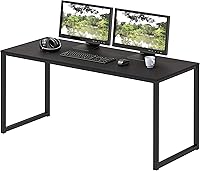
A deeper top can also help when you keep a lamp, planner, or second monitor on the surface. The PRAISUN 47 x 24-Inch Desk has a 23.6 in deep top and an open bottom for legroom.
Its width may suit a single-screen setup better than one with several broad monitor bases. Measure the items you plan to keep on the desk before deciding.
Choose a wider desk when your gear needs more room side by side. The PRAISUN 55 x 24-Inch Desk also measures 23.6 in deep, with a wider top than the 47 in option.
Both PRAISUN desks have metal frames and engineered wood tops. Their open bottom design leaves room for legs or storage bins, though bins will reduce the open floor space beneath the desk.
What size works for multiple monitors?
Start with the total width of the monitor bases or arm positions, then add room for your keyboard, mouse, and other equipment. A desk can be long enough for the screens but still feel cramped if its depth leaves little working space in front.
Measure the monitors in the positions you plan to use. Angle them as intended, since angled screens can take a different amount of width than a straight row.
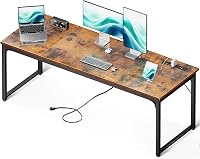
A long top can help when the setup includes several screens and other gear. The Coleshome 71-Inch Long Computer Desk measures 70.9 in wide and 23.6 in deep.
Its stated uses include multiple monitors, printers, laptops, and office essentials. Check the available room and the depth of your equipment, since a long desk still has a 23.6 in top.
How much space should you leave around the desk?
Leave enough room for the chair, drawers, doors, and a clear path through the room. A desk that fits against a wall may still make the space awkward if the chair cannot move back.
Measure from the wall to the nearest obstacle, then include the desk depth and the space you need behind it. Account for a window sill, radiator, cabinet door, or any cables that need to reach an outlet.
Think about storage below the desktop as well. A desk with an open bottom can leave room for your legs, while a cabinet or drawer unit may affect how close you can sit.
What is a good computer desk depth and width for your setup?
A 24 in deep desk is a useful baseline for a monitor and keyboard; choose more depth if your stand or work items need it. Choose width by measuring the complete side-by-side layout, then check that the desk fits your room with space for the chair.
Pick the PRAISUN 47 in desk for a smaller setup, the 55 in version when you need more width, or the Coleshome 71 in desk for a much wider layout. For placement ideas once you’ve chosen a size, read where everything goes in a computer desk setup.
Frequently asked questions
How deep should a computer desk be?
About 24 in is a useful starting point for a computer desk with a monitor and keyboard. Measure the monitor stand or arm, keyboard, and any items you keep on the surface, then leave enough room to position them comfortably without pushing the desk into a walkway.
Is a 24-inch-deep desk enough for two monitors?
A 24 in deep desk can work for two monitors if their stands or arms fit and you can place the keyboard in front with usable space. Check each monitor's base depth and the width they take up, then mock up the layout with tape before buying.
How wide should a computer desk be?
Choose desk width by adding the space needed for your monitor or monitors, keyboard, mouse, and items you want within reach. A wider top can reduce crowding, but measure the wall and leave room for drawers, doors, and a chair to move.
Is a wider or deeper computer desk better?
Choose more depth when your monitor stand, keyboard, and work area feel crowded front to back. Choose more width when you need side-by-side space for multiple screens, papers, or equipment; your room dimensions may limit either choice.