Are Particle Board Desks Any Good?
Yes, a particle board desk can work well for everyday computer use when it has suitable support, enough space, and a finish you can care for. Check the frame, dimensions, assembly needs, and weight guidance before choosing.
On this page (7 sections)
- Are particle board desks good for daily work?
- How should you choose a particle board desk?
- What tradeoffs come with particle board?
- Which desk suits a small home office?
- How do you set up and care for a particle board desk?
- What mistakes should you avoid when buying?
- How do you decide if a particle board desk is right for you?
A particle board desk can work well for everyday computer use when the top has suitable support, the dimensions fit your setup, and you protect the surface from moisture. The panel material matters, but so do the frame, edge finish, storage, and assembly.
Start with your equipment and room: measure the available space, count what needs to sit on the desktop, and check any stated weight limit. For a wider overview of desk layouts and features, see our computer workstation desk buying guide.
Are particle board desks good for daily work?
Yes, a particle board desk can be a sensible daily workspace if its construction matches your equipment and routine. Particle board is made from wood particles bound into a panel, often with a finished surface; the panel alone does not tell you how steady or useful the complete desk will be.
Look at how the top is supported. A frame, side panels, or reinforcement beneath the work surface can help distribute weight, while a long unsupported span may flex more under concentrated loads.
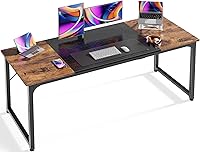
The Huuger Computer Desk pairs a particleboard top with a metal frame and reinforcement struts. It measures 63 in wide, 23.6 in deep, and 29.5 in high, so it suits someone who wants a broad surface for a computer and everyday work items.
Best for roomy metal-frame setups
Choose this style if you want generous width and don't need built-in drawers or a cabinet. Skip it if your room cannot spare the footprint or you need dedicated file storage.
How should you choose a particle board desk?
Choose by fit, support, storage, and assembly before comparing finishes. Those checks help you decide whether a desk will serve your routine, rather than buying based on its material label alone.
- Fit: Measure the desk area, chair clearance, and route through doorways. Check the usable top dimensions against your monitor, keyboard, lamp, and writing space.
- Support: Look for a frame or side structure that supports the top across its span. Reinforcement can matter on a wide desk or where heavier equipment will sit.
- Capacity: Use a published weight limit when available. Add up your monitor, computer, books, and other gear, and leave room for items you may add later.
- Surface and edges: Choose a finish that suits your room and care habits. Check exposed edges and seams because moisture can reach the core through vulnerable areas.
- Storage: Decide whether drawers, a file drawer, a keyboard tray, or open leg space matters more. Built-in storage takes space that could otherwise remain open.
- Assembly: Read the instructions before starting and sort the hardware. A stable result depends on correctly assembled connections and a level floor.
The Sauder Computer Desk in Brushed Maple has engineered wood construction, two drawers, a file drawer, and a slide-out keyboard and mouse shelf. Its storage layout suits a home office where papers and small supplies need a place, but its overall dimensions and weight limit are not available here, so confirm those details if they affect your fit.
Best for paper and supply storage
This option makes sense when drawers and a keyboard tray are part of your daily routine. Skip it if you need a known weight limit before buying or want an open desk without built-in storage.
For surface-size guidance, use our computer desk depth and width guide. A few inches can change whether your keyboard, monitor stand, and notebook fit comfortably together.
What tradeoffs come with particle board?
Particle board can provide a finished work surface and useful desk features, but it needs protection from moisture and edge damage. Solid wood offers a different material choice, while engineered wood desks can combine panels with storage or other functions.
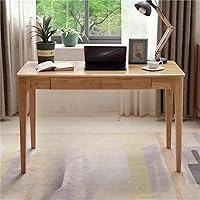
The ODCVKRT Solid Wood Desk with Drawers is a useful comparison if solid wood is a priority. It measures 47.2 in wide, 21.7 in deep, and 29.5 in high, with drawers for small items.
Best for small solid-wood workspaces
It is not a particle board desk, so compare it as a different material option. Its smaller footprint may suit a bedroom or study with limited floor space, but check that the desktop can fit your monitor and working materials.
A particle board or engineered wood desk can make sense when you want a particular size, finish, or storage layout. Solid wood may suit you better when the material itself is a priority.
Read our solid wood vs laminate desk comparison and metal vs wood desk frame guide to weigh those choices.
Which desk suits a small home office?
A desk with built-in storage can suit a small home office when it keeps supplies organized without taking more floor space than you have. The Bush Key West Computer Desk uses engineered wood and has a 54.02 in wide, 23.7 in deep work surface, a keyboard tray, and an adjustable shelf in its storage cabinet.
Bush Home gives this desk a weight capacity of 200 lb. Compare that limit with your equipment and supplies, and leave clearance for the keyboard tray to slide out.
Best for compact built-in organization
Choose it if a cabinet and tray help keep your workspace tidy. Skip it if you need open legroom or a single uninterrupted surface for wide equipment.
How do you set up and care for a particle board desk?
Assemble the desk on a level floor, follow its instructions, and keep the work surface dry. Correct assembly and simple care help prevent avoidable wobble and surface damage.
Lay out parts and hardware before assembly, and fit each connector as directed. Don't overtighten screws, since excess force can damage board or fastener holes; once assembled, check that the desk sits level and its connections feel secure.
Wipe spills promptly with a soft cloth. Use a desk mat under drinks or items that may leave moisture.
Avoid soaking edges or seams, and don't drag heavy equipment across the surface; lift it with help and set it down carefully.
Before moving the desk, remove equipment and supplies. Lift from supported parts of the frame rather than pulling or lifting by the desktop, which can put stress on joints and edges.
If the desk wobbles, first check for an uneven floor and loose connections. Our guide to fixing a wobbly desk explains what to inspect.
What mistakes should you avoid when buying?
The biggest mistake is choosing by material or appearance without checking the complete setup. A good-looking finish won't make an undersized top, unsupported span, or awkward storage layout work for you.
Don't guess at capacity from desk width. Use the stated limit when it is available, and leave some room between the combined weight of your equipment and that limit.
Don't overlook the chair, keyboard, or room around the desk. Measure where your chair needs to move and make sure a keyboard tray, cabinet door, or drawer has space to open.
Finally, don't treat particle board as spill-proof. Protect the surface, especially around seams and edges, and handle the desk carefully during assembly and moves.
How do you decide if a particle board desk is right for you?
Pick a particleboard top with a metal frame if you want a broad work surface and the Huuger's dimensions fit your room. Choose an engineered wood desk with storage if drawers, a file drawer, or a keyboard tray matter more than open space.
Consider the Bush Key West when its cabinet and 200 lb capacity match your needs. Choose the ODCVKRT if you prefer a solid wood desk and its compact dimensions suit your equipment.
Before you buy, measure the room, confirm capacity where available, and plan to keep the top dry.
For more finished wood options, browse our guide to wood computer desks and the finishes and matchups category.
Frequently asked questions
Are particle board desks strong enough for a computer?
They can be, if the desk is designed for your equipment and its frame supports the top well. Check the stated weight limit when available, then account for monitors, a computer, speakers, and other items.
Don't assume all particle board desks have the same capacity.
How long does a particle board desk last?
Its lifespan depends on construction, assembly, load, and care, so there is no useful single estimate for every desk. Keep the surface dry, tighten fasteners only as the instructions allow, and avoid moving the desk by lifting its top.
These steps reduce avoidable wear.
Can you repair a damaged particle board desk?
Small surface marks may be manageable with a finish repair made for the desk's coating, but swollen or crumbling board is harder to restore. Don't drive screws into a damaged edge or rely on a patch to carry a heavy load.
Check the manufacturer's repair guidance for that model.
Is a particle board desk better than a solid wood desk?
Neither material is automatically better for every workspace. Particle board desks can offer a finished look and useful features, while solid wood may suit buyers who value natural wood construction.
Compare the full desk, including frame, storage, dimensions, and care needs.