Narrow Computer Desks: When Slim Makes Sense
A narrow computer desk can free up floor space when its usable top still fits your daily setup. Measure the room, screen, keyboard, mouse and chair clearance before choosing a slim desk.
On this page (9 sections)
- When does a narrow computer desk work well?
- How do you measure a desk for your setup?
- How narrow is too narrow for a computer desk?
- Which narrow computer desk fits different needs?
- What trade-offs come with a slim desk?
- How should you set up and care for a narrow desk?
- What mistakes should you avoid when buying a narrow desk?
- Should you choose a narrow or compact computer desk?
- Which narrow computer desk should you choose?
A narrow computer desk can keep a small room usable when its top fits your equipment and work habits. Measure width and depth separately, then account for your chair, legroom and the space needed to move a mouse.
A slim desk suits a focused setup, such as a laptop or one monitor. It can become frustrating if you expect it to hold multiple screens, paperwork and accessories all at once.
Start by measuring the space and sketching where each item will go. For help with the measurements, see our guide to computer desk depth and width.
When does a narrow computer desk work well?
A narrow computer desk works well when floor space is limited and your work fits on a small surface. It is a practical choice for a laptop, a single monitor or a study spot with a short list of daily-use items.
Think about what needs to stay within reach. A laptop and mouse take less surface area than a monitor, full-size keyboard, speakers and an open notebook.
Measure the clear floor space, including baseboards, nearby furniture and anything that projects from the wall. Then measure your equipment and lay out its rough positions on paper or with removable tape.
A slim footprint can leave more open floor in a bedroom or shared room. See our guide to fitting a computer desk in a bedroom or ideas for a computer desk in a living room.
How do you measure a desk for your setup?
Measure the desk’s width and depth, then compare both with your planned equipment layout. A desk may fit the room but still leave too little space for the screen, keyboard, mouse or your legs.
| Measure | What to check |
|---|---|
| Room width | Clear wall or floor space, including trim and nearby furniture |
| Desk width | The full span of the desktop from left to right |
| Desk depth | The distance from the front edge to the back |
| Screen space | Monitor base or laptop footprint, plus gaps between devices |
| Input space | Keyboard placement and room to move the mouse |
| Seated space | Chair position, knee room and the path to sit down |
Mark the full desk outline on the floor with painter’s tape. Place your chair in front of it and check whether you can sit, turn and move as you normally would.
Plan for the equipment, not just the empty desktop. Leave space for cables and plugs behind the desk if it will sit close to a wall, and check whether the chair can pull out without hitting another piece of furniture.
For a closer look at desk sizes, see how wide and deep a computer desk should be.
What fits on a narrow computer desk?
A narrow computer desk can fit one main device and a few daily-use items if the dimensions suit your particular gear. Draw a simple top-down plan before buying so you can spot crowding early.
Start with the monitor base or laptop, then add the keyboard and mouse. Include anything that must stay on the surface, such as a notebook, lamp or speakers.
If the desk has a monitor shelf, check its dimensions and the clearance below it. A shelf can raise the screen and free up some of the main top, but the keyboard and mouse still need room in front.
Put supplies you use less often on a nearby shelf or in a drawer. Our guide to whether a monitor shelf is worth it explains the space trade-off.
How narrow is too narrow for a computer desk?
A desk is too narrow when your essential equipment cannot fit in usable positions or leaves no room to work comfortably. The word “narrow” does not tell you whether a specific desktop will suit your setup.
Sketch each item to scale or place paper cutouts on a measured outline. If the monitor, keyboard and mouse overlap, or you have no room to move the mouse, look for a wider surface.
Depth matters as much as width. A shallow desk can have room side to side but put the monitor close to the front edge or leave little space for a keyboard.
If your setup needs more width, compare 48, 55 and 60-inch computer desks. If you need a smaller overall footprint, see our guide to compact computer desks.
Which narrow computer desk fits different needs?
The right desk depends on which dimension is tight and what must fit on the surface. These four options range from a very small shelf desk to longer, shallow desks with room to spread items side to side.
Dripex 27.5-Inch Compact Desk
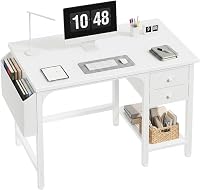
The Dripex suits a tight wall span and a small, organized setup. Its three-tier design gives you a desktop plus upper and lower shelves, so items that do not need to stay in the main work area can sit elsewhere.
The overall dimensions are 27.5 in wide, 23.6 in deep and 31.1 in high. The desktop is 27.5 x 15.7 in, and the upper shelf is 27.5 x 7.9 in.
Plan around the desktop measurement for your keyboard, mouse and screen, rather than assuming the full depth is clear work area.
Choose it if you have a laptop or a small single-monitor setup and want shelf space for other items. Skip it if you need a wide monitor layout, extensive paperwork space or a plain, unobstructed desktop.
NELYE 63 x 20-Inch Mid-Century Walnut Desk
The NELYE 63-inch desk suits a room with plenty of wall width but limited front-to-back depth. Its long surface gives you more side-to-side room for work items, but its nearly 20-inch depth calls for a careful screen and keyboard layout.
The desk measures 62.99 in wide, 19.69 in deep and 29.53 in high. It has a thick MDF tabletop and solid wood legs, with no drawer.
Choose it if your setup benefits from a long shared surface or space for work materials beside a computer. Skip it if your main problem is a narrow wall span, or if you need built-in storage.
PRAISUN 47 x 20-Inch Rustic Brown Desk
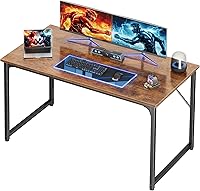
The PRAISUN suits a single-user setup that needs a moderate amount of desktop space and built-in charging ports. Its top is 47.2 in wide and 19.7 in deep, a middle ground between a very small desk and a long tabletop.
It has four AC outlets, one USB port and one USB-C port. The surface is made of particleboard, with steel tubes and reinforcement struts beneath the top.
Choose it if the width fits your room and you want charging connections at the desk. Plan where its power cord and your device cables will go before placing it close to a wall.
Skip it if you want a desk narrower than 47 in or need a deeper top for equipment and paper.
NELYE Extra Long Desk with Bookshelf
The NELYE desk with bookshelf suits a room where front-to-back space is especially limited, but you still need a wider surface. Its top is 47.24 in wide and 15.75 in deep, and it has an L-shaped storage layer.
The desk uses an MDF top and a wood frame and legs. The shallow surface makes equipment placement important: measure your monitor base, keyboard and mouse to confirm that they fit together.
Choose it if a shallow footprint matters and your setup can work within the available depth. Skip it if you need a monitor, keyboard and mouse arranged with extra front-to-back room, or if you need a longer top than about 47 in.
What trade-offs come with a slim desk?
A slim desk saves floor space, but its smaller surface limits how you can arrange equipment. This matters most if you switch between screen work, paper tasks and several accessories.
You may also need storage nearby for items that do not fit on top. Check that a shelf or cabinet will not take back the floor space the desk saves or block the chair and walkway.
Look at the frame and shelves as well as the desktop. Supports and built-in storage can affect knee room, so check where they sit in relation to your chair.
Plan cable routing before placing the desk. Measure the gap between the desk and wall if plugs need room, then use our guide to hiding cables on a computer desk for ways to keep cords organized.
How should you set up and care for a narrow desk?
Set up a narrow desk by placing essential equipment first and moving occasional items off the top. This keeps the limited surface clear for the tasks you do most.
Assemble the desk according to its instructions, keep the parts organized, and tighten connections as directed. Before loading it, place it on a level area and make sure its feet or frame sit evenly.
Put the screen in a position you can view without leaning forward, then place the keyboard and mouse where your hands can reach them without crowding the edge. Keep drinks and clutter away from electronic equipment, and use a nearby shelf or drawer for supplies you do not need every hour.
For ordinary care, follow the desk’s material and assembly instructions. Wipe the surface with a soft cloth and a cleaner suitable for its finish, and avoid leaving moisture on wood or MDF surfaces.
What mistakes should you avoid when buying a narrow desk?
The most common mistake is choosing by the room footprint alone. A desk can fit between two walls yet fail to fit the monitor base, keyboard and mouse in a useful arrangement.
Another mistake is treating overall depth as clear desktop space. Shelves, frames and storage can change the usable area, as the Dripex’s 15.7 in desktop illustrates despite its 23.6 in overall depth.
Do not overlook chair clearance, knee room or cable space. These details affect how the desk works in the room every day, even when the top dimensions seem right.
Finally, do not buy a narrow desk expecting it to serve as a large workstation later. If your equipment list is growing, choose a wider surface now or plan where the extra items will be stored.
Should you choose a narrow or compact computer desk?
Choose a narrow desk when width is the main constraint, and choose a compact desk when the full footprint needs to stay small. The terms overlap, so use the actual dimensions to make the decision.
If front-to-back space is tight, a shallow desk may help, but confirm that your monitor, keyboard and mouse fit. If your setup needs multiple devices or paperwork, a wider top will be easier to arrange, provided the room can take it.
A laptop or single-monitor setup may work well on a small surface. If your paper layout already feels crowded, move up in size and use computer desk setup ideas to plan where each item belongs.
Which narrow computer desk should you choose?
Choose a narrow computer desk by matching its usable top to your equipment and the room around it. If the layout leaves a clear place for your chair, mouse and cables, the smaller footprint can work well.
Pick the Dripex for a very tight width and separate shelf levels. Pick the NELYE 47.24 in desk for a shallow top with more width, or the PRAISUN if its 47.2 x 19.7 in surface and built-in charging ports fit your setup.
Choose the 62.99 in NELYE when you need a long work surface and have enough wall width. For an overall small footprint, compare more options in our compact computer desk guide.
Frequently asked questions
How narrow can a computer desk be?
There is no single minimum width for every setup. Measure the items that must sit on the desk, including the monitor base, keyboard and mouse.
Then leave room to use them without crowding.
Check depth too, since a narrow width does not guarantee that the screen will sit comfortably far back.
Is a 16-inch-deep desk enough for a computer?
A 16-inch-deep desk may suit a compact laptop setup, but it can feel tight with a monitor, keyboard and mouse sharing the top. Measure your screen base and input devices, then check how much usable space remains in front of the monitor before choosing.
Can a narrow computer desk hold two monitors?
It depends on the monitors' combined width, their stands and the room left for your keyboard and mouse. Measure the setup as arranged, including any gaps between screens, and compare it with the desk's usable top.
A wider desk may be a better fit if equipment would overlap.
What should I measure before buying a narrow desk?
Measure the open floor area, the desk's full width and depth, and the route through doors or halls. Then measure your monitor base, keyboard, mouse and any accessories that need to stay on top.
Check chair clearance and legroom so the desk fits both your setup and your seated position.
Is a narrow desk the same as a compact desk?
The terms overlap, but they describe different things. Narrow usually points to a smaller width, while compact can mean a short width, shallow depth or an overall small footprint.
Compare the actual dimensions and layout instead of relying on either label.