Do Computer Desks With Wheels Stay Put?
A computer desk with wheels can stay put when its locking casters are engaged on a level floor. Locks reduce rolling, but they don't stop every desk from shifting or wobbling.
On this page (7 sections)
- Do computer desks with wheels stay put when locked?
- What should you check before buying a rolling desk?
- Which floor surfaces work with rolling computer desks?
- How can you keep a rolling desk from shifting?
- When is a computer desk on wheels useful?
- How do rolling desks compare with fixed desks?
- Which computer desk with wheels should you choose?
Yes, a computer desk with wheels can stay put when its locking casters are engaged on a level floor. Locks help prevent rolling, but they don't guarantee that the desk won't shift or wobble when you type or press on its edge.
Check how many casters lock, whether their design suits your floor, and whether the desk will sit level where you plan to work. A mobile desk is most useful when you can roll it for a reason, then lock it in place for daily use.
Do computer desks with wheels stay put when locked?
Locking casters reduce rolling when engaged. Some rolling desks have two locking wheels; others may use a different setup, so check the controls on the model you choose.
A wheel lock limits rotation or rolling at that caster. The desk may still move if the floor slopes, the frame flexes, or you push hard enough to shift the whole unit.
Lock the casters before adding equipment. Then gently test the desk from its usual working position and make sure each lock is fully engaged.
What should you check before buying a rolling desk?
Check the lock count, caster design, desk footprint, and the floor where you'll use it. These details help you judge whether a mobile desk can suit a fixed work spot.
A compact cart can be easy to move, but a small footprint may leave less room to position your chair and equipment. Compare the desk's depth and width with the space you have; our guide to computer desk depth and width can help with measuring.
Consider what's on and around the desk, too. A keyboard tray or storage shelf can affect how you arrange your setup.
Cables may snag if you roll the desk without gathering them first. See how to hide computer desk cables for ways to keep cords organized.
How do locking casters affect desk stability?
Locking casters help keep a desk from rolling, but stability also depends on the floor and frame. Two locks can be enough for some uses, but the desk can still shift if it sits unevenly.
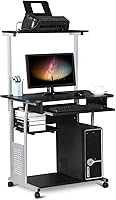
The Yaheetech Rolling Desk with Hutch and Shelves has four casters, two of which lock. Its pull-out keyboard tray and shelves may suit a compact setup that you want to move occasionally.
Check that the wheels sit flat on your floor and that the locks are easy to reach after setup. The detachable top shelf lets you adapt the storage arrangement.
Which floor surfaces work with rolling computer desks?
A smooth, level floor makes it easier to roll a desk and engage its locks. Floor type and debris can affect how casters travel, so move the desk carefully and check the path first.
Some caster descriptions mention non-marking or rubber wheels. These features may help with movement, but they don't promise that every floor finish is safe from marks or dents.
If your floor is delicate, consider a suitable mat under the desk. Avoid rolling over cords, rug edges, or uneven transitions, which can catch a wheel and move the desk suddenly.
Are non-marking casters enough to protect a floor?
Non-marking casters are a useful feature, but they aren't a guarantee against floor damage. Dust or grit under a wheel can still scratch a surface as the desk moves.
The Techni Mobili Rolling Laptop Cart has double-wheel, non-marking casters with locking mechanisms. Its height adjusts from 28.25 to 43 in using dual adjustment knobs.
Before regular use, roll it a short distance over a clean area and check how it behaves on your floor. Use a protective mat if your flooring needs extra care.
How can you keep a rolling desk from shifting?
Engage the locks, place the desk on level ground, and avoid pushing against its edge while working. These steps help reduce rolling and movement during everyday use.
- Move the desk into its working position.
- Check that all wheels sit flat on the floor.
- Engage each available lock.
- Test the desk gently before setting up your equipment.
- Recheck the locks after moving the desk or changing its position.
A floor mat can help protect flooring, though it won't correct an uneven surface or loose frame. If the desk still wobbles, inspect the assembly and compare the checks in how to fix a wobbly desk.
Does an adjustable rolling cart stay stable at different heights?
An adjustable rolling cart needs its locks engaged at the height you choose. Height adjustment changes the work surface position, so check for movement again after making an adjustment.
The Techni Mobili cart adjusts from 28.25 to 43 in using dual adjustment knobs. Its open storage compartment has an accessory shelf.
Tighten the adjustment knobs as directed, then check that the desktop sits at the height you want. If you often change between sitting and standing, also consider where the keyboard, screen, and cables will sit.
When is a computer desk on wheels useful?
A rolling desk works well when you need to move a workspace between nearby spots. It can be useful in a bedroom, shared room, or small space where a fixed desk would be harder to reposition.
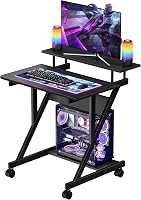
The Pamray Rolling Computer Table has four caster wheels, two lockable and two swivel. It also has a built-in outlet, LED lights, pegboards, and storage shelves.
Its accessories may suit a gaming area or a desk that also serves other tasks. Check that the outlet and cable arrangement work for your setup before moving it.
If you need a smaller footprint, compare it with a compact computer desk. For a room-specific fit, our guide to fitting a computer desk in a bedroom covers placement and space planning.
What if you need a rolling desk for a sofa or bed?
A rolling cart can suit a sofa or bed setup if its height and base fit the space. Measure the clearance around the furniture and make sure you can reach the desk locks once it's in position.
The Tangkula Rolling Desk Cart with Keyboard Tray has four 360-degree casters, two of which lock. It also has a pull-out keyboard tray, a bottom shelf, and removable hooks.
Its compact tabletop may suit a laptop or other limited setup. Check the desk height and your seated position before relying on it as a regular work surface.
How do rolling desks compare with fixed desks?
Choose a rolling desk if you need to move your workspace; choose a fixed desk if it will stay in one place. A fixed desk avoids caster locks and wheel clearance, while a rolling model makes occasional repositioning easier.
Think about what you'll move with it. A monitor, computer, or connected accessories may need to be unplugged or secured first, and a desk with shelves may be harder to roll through tight spaces.
For more layout guidance, see where to place items on a computer desk. If you want a desk for regular multi-monitor work, compare the space you need with our guide to computer desks for three monitors.
Which computer desk with wheels should you choose?
A computer desk with wheels can stay put when its locks work with a level floor and a careful setup. Choose based on how often you'll move it, the space available, and which storage or adjustment features suit your work.
Pick the Yaheetech for a compact desk with a hutch and shelves, the Techni Mobili for adjustable height, the Pamray for built-in accessories, or the Tangkula for a keyboard tray and hooks. To compare more options, see our guide to rolling computer desks.
Frequently asked questions
Do locking casters keep a computer desk from moving?
Locking casters help keep a computer desk from rolling while you work. They don't guarantee that the whole desk will stay perfectly still, especially if the floor is uneven or you push against it.
Lock the wheels, check that each one is engaged, and test the desk gently before loading it.
How many wheels on a rolling desk should lock?
Many rolling desks have two locking casters, though the number varies by model. Lock every caster designed to lock, then check whether the desk still shifts when you type or lean lightly on the edge.
If it moves, inspect the floor and frame as well as the wheel locks.
Can computer desk wheels damage floors?
Wheel material and floor condition affect how a rolling desk moves across a surface. Some designs describe their casters as non-marking or floor-friendly, but that doesn't guarantee protection on every floor.
Clear grit, move the desk gently, and use a suitable floor mat if your surface needs added protection.
Why does a desk wobble even when its wheels are locked?
Locked wheels limit rolling, but they don't fix loose joints, an uneven floor, or a frame that flexes. Check that the desk is assembled as directed and sits level, then tighten any accessible fasteners.
For more checks, see our guide to fixing a wobbly desk.