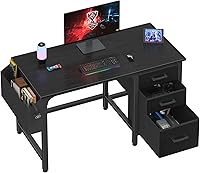
Which Storage Does Your Computer Desk Need?
Choose desk storage based on what you need close at hand: drawers suit small items and papers, open shelves fit gear you reach often, and a cabinet or printer space works for larger items. Measure the available space and check the storage dimensions before choosing.
On this page (7 sections)
A computer desk with storage should match what you keep nearby: drawers for small supplies and papers, open shelves for gear you reach often, and dedicated spaces for a printer or computer tower. Measure your items and room before choosing, since storage that blocks your legs or crowds the work surface can get in the way.
Start by listing what belongs at the desk and how often you use it. Then choose storage that keeps daily items easy to reach and less-used supplies out of the work area.
For a broader overview of desk types and features, see our computer workstation desk buying guide. This guide focuses on matching storage to your actual equipment and habits.
Which computer desk storage fits your items?
Use drawers for small items, open shelves for larger gear, and cabinets for papers you want covered. A printer shelf or tower space makes sense when you have that equipment and can confirm it fits.
| Storage type | Works well for | Check before choosing |
|---|---|---|
| Drawers | Cables, stationery, notebooks and small accessories | Inside dimensions, drawer count and which side they sit on |
| Open shelves | Books, baskets, a computer tower or frequently used gear | Shelf height, depth, weight guidance and legroom |
| File cabinet | Folders and work papers | Folder fit, access direction and room to open it |
| Hutch or monitor shelf | Items you want above the desk surface | Height, depth and whether it suits your screen setup |
| Printer space | A printer and related supplies | Printer footprint, tray access and cable path |
| Side pockets | Small items you want to reach quickly | Pocket size and whether they interfere with chair movement |
An item being called a shelf does not tell you its usable dimensions or weight limit. Check those details against your own equipment, and leave room to plug in and remove cables.
A desk can combine several storage types, but more compartments are useful only if you can reach and use them. The computer desk setup guide can help you decide where your screen, keyboard and other essentials belong.
How many drawers do you need?
Choose the number of drawers by how many groups of small items you need to separate. Count what you plan to store, then check the dimensions so the drawers can hold those items.
A few drawers may be enough for pens, charging cables and a notebook. More drawers can help divide supplies, but shallow or narrow drawers may not fit the papers or accessories you have in mind.
Measure the largest object you want to put away, not just the total amount of clutter. A notebook, envelope or power adapter can be awkward to store if the drawer is too short or shallow.
Think about which side of the desk will hold the drawers. A reversible layout can help when your room arrangement changes, but fixed drawers need clearance to open fully beside a wall, chair or cabinet.
For more detail on drawer setups and options, see computer desks with drawers. If you expect to store folders and paperwork, compare that with a desk with a built-in file cabinet.
When are shelves more useful than drawers?
Choose open shelves for equipment you need to see or reach without opening a drawer. They can suit books, a computer tower or a small basket of supplies, provided the shelf dimensions work for your items.
Shelves leave items visible, which can make access easier but also keep visual clutter in view. Use them for equipment you reach often and keep less-used items in drawers or closed storage.
Adjustable or removable shelves can make space for a taller item. Before buying, check the shelf positions and the amount of clearance each arrangement provides.
A monitor shelf serves a different purpose from general storage: it raises the screen and frees some surface space underneath. See our guide to computer desks with monitor shelves if screen placement is part of your decision.
Is a computer tower shelf right for your setup?
A tower shelf can work when its opening fits the case and leaves enough room for airflow and cables. Compare the tower's width, height and depth with the usable space, and consider whether its position will limit legroom.
The Casaottima desk below has an 11.6 in wide PC shelf, according to its product details. That width alone does not confirm a fit for every tower, so measure the case and check the full opening before choosing.
If the case will sit under the desktop, make sure the shelf or support does not block chair movement. Think about where the power and display cables will run as well.
What should you check before choosing a computer desk with storage?
Check each storage space against the item it needs to hold, then confirm the desk fits your room and working position. Overall desk width cannot tell you whether a drawer, printer shelf or tower opening will work.
Use this short measurement list:
- Measure the largest items you plan to store, including folders, printer and computer tower.
- Compare each item with the storage space's inside width, depth and height.
- Mark the desk footprint in the room, including space for your chair.
- Check drawers and cabinet doors can open without hitting a wall or another piece of furniture.
- Leave room for cables, plugs and any printer trays that need to extend.
- Confirm that the storage arrangement leaves your usual keyboard and mouse area clear.
Storage can also affect posture and movement. A deep drawer under the main work area may restrict your knees.
A tall shelf can affect where a monitor sits. For desk dimensions and workspace planning, read how deep and wide a computer desk should be and how high a computer desk should be.
Which desks offer different storage layouts?
Pick a desk based on the storage layout you will use most. These four options combine drawers, shelves, a hutch or printer space in different ways.
Huuger Computer Desk with 6 Drawers
The Huuger suits a setup that needs several fabric drawers and an adjustable middle shelf. Its drawers can go on the left or right, which gives you a choice of layout.
The product details give two drawer sizes: 14.3 x 17.7 x 3.7 in and 8.5 x 17.7 x 6.8 in. Use those measurements to see whether your papers and accessories will fit.
The middle shelf has two height positions and can be removed. That flexibility may help if you need room for a taller item beneath it.
Choose this layout if you want divided drawer storage with a flexible shelf. Check the drawer side and total desk footprint against your room before you settle on a spot.
Sweetcrispy 55-Inch Desk with 6 Fabric Drawers
The Sweetcrispy pairs six fabric drawers with two storage shelves. It fits a buyer who wants small items tucked away and larger gear visible on shelves.
Its middle shelf can be adjusted or removed to make room for taller items, such as books or a computer tower. The desk is about 54.9 in wide and 18 in deep, so compare those dimensions with your available space.
Choose it if you want both drawers and open shelving across a wider desk. Check where the drawers and shelves sit in relation to your chair and equipment.
Casaottima 48-Inch Desk with Hutch and 3 Drawers
The Casaottima has three fabric drawers, an overhead hutch, display shelves and a PC shelf. This layout suits a compact setup that uses vertical space for items and equipment.
The PC shelf is 11.6 in wide, and the desk has a 36 in main desktop with an 11.6 in side shelf. Measure your tower and the space it needs for cables before relying on that shelf.
The hutch raises items above the desktop, so check its height against your monitor and the room around the desk. The product details give an overall height of about 59.65 in.
Choose it if you need a mix of compact drawer and raised shelf storage. Confirm that the hutch and side shelf fit the items you plan to put there.
EnHomee 56.5-Inch Desk with Printer Space
The EnHomee combines drawers, open shelves and side pockets with a dedicated printer space. It may suit a work area where the printer needs to stay near the desk.
The desk is 56.5 in wide and 19.6 in deep. Measure your printer and allow space to load paper and reach its controls before choosing its location.
This layout also includes a 40 x 7 in monitor stand. Check that its position suits your screen and leaves enough usable desktop for your keyboard and mouse.
Choose it if printer access and mixed storage matter more than a simple drawer-only layout. Confirm the printer space dimensions and the room needed for cables.
How do you keep desk storage useful?
Store everyday items where you can reach them without leaving your chair, and move occasional supplies out of the main work area. A simple arrangement keeps the desktop clear without burying essentials.
Keep frequently used items in the top drawer or on an open shelf at arm's reach. Put backup supplies and papers you rarely need in lower drawers or a nearby cabinet.
Group similar items together, such as charging cables, writing supplies and work documents. Small trays or pouches can help prevent loose items from mixing, as long as they fit the storage space.
Leave the main work surface for items you use during the task at hand. If cables are part of the clutter, our guide on hiding cables on a computer desk covers ways to route them neatly.
Which storage should you choose?
Choose drawers for small supplies, shelves for gear you reach often, and a printer shelf or file cabinet when you have a specific item to accommodate. Before buying, check the usable dimensions, opening clearance and space left for your chair and work surface.
If your main need is a drawer layout, compare computer desks with drawers. For open shelving, see computer desks with shelves, then choose the arrangement that matches the items you measured.
Frequently asked questions
How many drawers should a computer desk have?
Choose enough drawers to sort the items you use at your desk, such as cables, notebooks and stationery, without making storage harder to reach. A desk with 3 drawers may suit a short list of essentials, while 6 drawers can help separate more small items.
Check each drawer's size and placement before deciding.
Are shelves or drawers better for a computer desk?
Drawers keep small supplies and papers out of sight, while open shelves make larger items easier to see and reach. Choose drawers for items you want tucked away, shelves for gear you access often, or a mix if you need both.
Leave enough room for knees and chair movement.
Does a computer desk with storage need a file cabinet?
A built-in file cabinet can help if you regularly keep folders or documents at your workstation. For only a few papers, a drawer or separate file box may take less space.
Check the cabinet's opening direction and usable dimensions against the folders you plan to store.
Can a computer desk with storage hold a printer?
Some desks include a printer shelf or open storage area, but fit depends on the space's width, depth and height. Measure the printer, including room for paper trays, cables and access to controls.
Confirm that the shelf is intended to support the printer before placing it there.
Should I put my computer tower on a desk shelf?
A tower shelf can keep the computer off the floor and within reach, but check the shelf's width and the case's dimensions first. Leave room for cables and airflow, and make sure the shelf does not block your legs.
A floor placement may work better when the tower is too large.