Do You Need a File Cabinet Built Into Your Desk?
A computer desk with a file cabinet makes sense if you use paper often and want files close at hand. Choose separate storage if you need more flexibility or want to keep the area under your desk open.
On this page (7 sections)
- When does a computer desk with a file cabinet make sense?
- What should you check before choosing a file drawer?
- Is a built-in file cabinet better than a separate one?
- Which file cabinet desk fits your room and routine?
- How much room should you leave around the desk?
- How do you keep the work area practical?
- Which computer desk with a file cabinet should you choose?
A computer desk with a file cabinet suits you if you handle paper often and want files close at hand. If you rarely use paper, a desk with general storage or a separate cabinet may leave you more room to arrange your workspace.
Consider how often you reach for documents, what sizes you store, and how much room the cabinet takes under the desktop. The right setup keeps work materials accessible without crowding your chair or work surface.
When does a computer desk with a file cabinet make sense?
A computer desk with a file cabinet makes sense when you regularly use paper files and want them near your computer. A built-in drawer can keep documents off the desktop and reduce the need for a second piece of furniture.
It may suit a home office where space is limited, or a work routine that involves forms, invoices, or printed reference material. Measure the full desk area, including room for your chair and legs, before settling on a layout.
If you mostly store small items like pens and cables, ordinary drawers may be enough. Our guide to which storage a computer desk needs compares drawers, shelves, and other ways to keep supplies close.
What should you check before choosing a file drawer?
Check which file sizes the drawer fits, how the cabinet is arranged, and whether it leaves enough legroom. Drawer labels alone don't tell you whether it will suit your folders or the way you work.
Look for clear details about the file drawer's support or hanging-folder setup. If your documents use a specific size, confirm that size before you buy.
Also consider how much you need to reach the drawer. A file drawer that sits where your chair or knees need to go may be awkward to use.
A reversible cabinet can give you a choice of left- or right-side placement. That can help when a wall, door, or other furniture limits your layout, but measure both sides of the desk before assembly.
Is a built-in file cabinet better than a separate one?
A built-in file cabinet combines your desk and document storage in one footprint. A separate cabinet gives you more freedom to place or move storage, and can suit you if the desk's built-in drawer doesn't match your filing needs.
When should you pick built-in storage?
Pick built-in storage if you want documents close by without adding another furniture piece. It's useful for files you reach for during the workday.
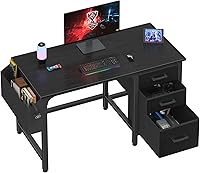
The Lufeiya 47-Inch Computer Desk with File Drawers has an adjustable file drawer for letter-size or legal-size files, plus 2 smaller drawers. Its cabinet can be installed on the left or right.
This desk is 46.6 in wide and 19.7 in deep. Check those measurements against your room and equipment, and make sure the cabinet location leaves space for your legs.
When is a separate cabinet a better choice?
Choose separate storage if you want more choice over where files sit or expect your storage needs to change. It also lets you choose a desk based on its work surface and add a cabinet that fits your documents.
Before buying both pieces, map out the space each will occupy. A cabinet beside your desk needs a clear path for its drawer to open, and a unit under the desktop needs to clear your chair and knees.
Which file cabinet desk fits your room and routine?
The best fit depends on how much space you have, how many files you keep, and how you use the room. Compare dimensions and file drawer details before choosing a style.
Is a white desk with a file cabinet right for a small space?
A reversible desk can help when you need to choose which side holds the file cabinet. The Lufeiya White 47-Inch Desk with File Cabinet has an adjustable file drawer for letter-size files and 2 smaller drawers.
It's 46.6 in wide and 19.7 in deep.
White finishes may suit a bright or neutral room, but match the desk to the rest of your space. Measure the work area first, including room to pull out the chair.
Should you choose a farmhouse desk with a file drawer?
A farmhouse desk may suit you if you want a wood-grain look and several storage drawers. The Vabches Farmhouse Desk with File Drawer has an adjustable file drawer with a metal rod and measures 47.2 in wide by 19.7 in deep.
Its brown and white finish may fit a room with farmhouse decor. Check the dimensions and make sure the drawer arrangement suits what you plan to store.
Do you need more surface and storage space?
A wider desk may fit if you want more desktop room alongside storage. The SEDETA 55-Inch Farmhouse Desk with 3 Drawers measures 55.1 in long and 19.7 in deep, with 3 drawers, including one for A4 and letter-size documents.
It also has an open side rack and an adjustable lower shelf.
Consider the whole arrangement, not just desktop length. Check that the side rack and lower shelf work with your room and the items you plan to store.
How much room should you leave around the desk?
Leave enough room to sit comfortably, pull out the file drawer, and reach your work materials. A desk can fit against a wall and still feel cramped if the chair or cabinet blocks movement.
Measure the desk width and depth, then mark where the chair and open drawers will extend. Compare that space with doorways, nearby furniture, and the route you use to enter or leave the work area.
For a full setup plan, see where everything goes on a computer desk. If the main concern is organizing everyday items rather than paper files, compare computer desks with drawers and computer desks with shelves.
How do you keep the work area practical?
Keep frequently used files in the easiest drawer to reach, and store less-used papers elsewhere. This leaves the desktop available for your computer and current task.
The OSHA computer workstation guidance offers general advice on arranging a workstation. Use it as a starting point, then adjust your layout to fit your room and work routine.
Which computer desk with a file cabinet should you choose?
Choose a computer desk with a file cabinet if you handle documents regularly and the drawer fits your file sizes. For a small room, compare the Lufeiya desks' reversible layouts; for a farmhouse look, consider the Vabches; for a longer desktop with varied storage, consider the SEDETA.
Choose a separate cabinet if flexibility matters more than keeping storage attached to the desk. For more options, see our guide to desk storage choices.
Frequently asked questions
Is a file cabinet built into a desk worth it?
It can be worth it if you handle paper often and want files within reach. Check that the drawer fits the file sizes you use and that the cabinet placement leaves room for your legs.
If you rarely use paper, a drawer for everyday supplies or a separate cabinet may suit you better.
Can a desk file drawer hold letter-size files?
Some desks have an adjustable file drawer designed for letter-size files, while others specify A4 or letter-size documents. Check the drawer's stated fit before buying, and confirm whether it uses hanging folders if that's how you organize paperwork.
Should I choose a desk with a file cabinet or a separate cabinet?
Choose a built-in cabinet when you want a single furniture piece and keep frequently used papers close. A separate cabinet gives you more choice about where storage sits and can be easier to move or replace.
Measure both the desk area and the cabinet's planned location before deciding.
How do I choose a computer desk with a file cabinet?
Start with the files you keep, then check drawer capacity, desk width and depth, and whether the cabinet can go on either side. Leave enough space for your chair and legs, and compare the remaining surface area with your monitor and other work gear.