9 Best Standing Desks for Two Monitors (November 2026)
The best standing desks for dual monitor setups include the VIVO STAND-V002F Dual LED LCD Monitor Free-Standing for adding two monitors to a desk you already own, the FLEXISPOT EN1 One-Piece Standing Desk (best overall), and the COMHOMA Electric Standing Desk with Drawers for a tidy dual monitor desk.
On this page (9 sections)
- The best standing desks and risers for two monitors
- How the two-monitor standing desks compare
- How we compared these dual monitor desks
- What to check before you buy a standing desk for two monitors
- Does a standing desk for two monitors need a monitor arm?
- Should you plan for a third screen later?
- How much weight should the desk carry?
- Do memory presets matter with two monitors?
- The best standing desk for 2 monitors: final verdict
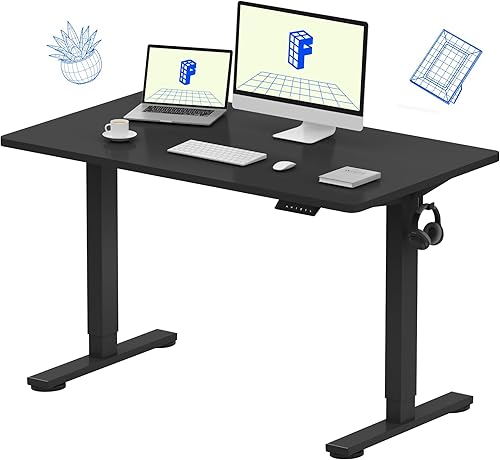
The best standing desk for 2 monitors is the FLEXISPOT EN1, a 48 x 24 inch electric desk with a one-piece top and four saved heights. Its smooth surface and 176 lb capacity handle two screens without the center seam that catches a mouse or a notebook.
If you already own a solid desk, the VIVO STAND-V002F arm gets both monitors to standing height for less than a new desk. For a small room, the FITUEYES 32 inch riser covers a tight setup.
Our picks at a glance
-
1
 Best for adding two monitors to a desk you already own
VIVO STAND-V002F Dual LED LCD Monitor Free-Standing
9.7/10 our score
See it on Amazon -
2
-
3
 Best for a tidy dual monitor desk
COMHOMA Electric Standing Desk with Drawers
9.7/10 our score
See it on Amazon
- 4
 Best for turning a fixed desk into a standing stationCheck it
- 5
 Check it
Claiks Electric Height Adjustable Standing Desk
Best for a warm wood finish - 6
 Check it
Veken 47.2 Inch Large Electric Standing Desk
Best for cable-heavy dual monitor rigs - 7
 Check it
Monomi 48"x24“ Electric Height Adjustable Standing Desk
Best for sharing a desk between people - 8
 Check it
FEZIBO Standing Desk 48 × 24 Inch
Best for a lighter budget - 9
 Check it
FITUEYES Height Adjustable Standing Desk 32” Wide
Best for a compact corner
The best standing desks and risers for two monitors
FLEXISPOT takes the top spot for most people, while the rest of this list solves a specific need: a tight budget, a fixed desk, a shared office or a compact corner. Pick by the job before you compare small differences.
VIVO STAND-V002F Dual LED LCD Monitor Free-Standing: Best for adding two monitors to a desk you already own
- Fits 13 to 27 inch screens
- 90 degree tilt, 180 degree swivel, 360 degree rotation
- 13 x 10.5 in weighted base
- Detachable VESA plates
A freestanding arm that lifts two screens above the desktop, so you can stand at an existing desk without buying a new one. Cable clips run along the arms and center pole.
Pros
- No drilling or wall mount
- Full tilt, swivel and rotation
- Padded base protects the desk
Cons
- Screens up to 27 in only
- Needs a deep desk to keep the base within reach
This arm suits anyone who likes their current desk and just wants the screens higher when they stand. It holds two screens from 13 to 27 inches at up to 22 lb each, and the 13 x 10.5 inch base sits on the desktop without drilling.
The arms tilt 90 degrees either way, swivel 180 degrees and rotate a full 360, so you can angle both monitors toward your standing position. Height is set by sliding the arms along the center pole rather than by a motor, so there is no electric range to quote.
Detachable VESA plates make the fitting easier: screw the plate to the back of each screen behind the desk, then hang the screen on the arm. Cable clips on the arms and center pole keep monitor and power leads tidy.
The base needs depth: leave room so the screens stay over the base rather than pulled forward. VIVO warns against pulling monitors too far forward or back unless the stand is bolted down.
Against the electric desks here, the arm does one job well and adds no surface of its own.
Buy it if your desk is already the right height and you only need the screens lifted. Skip it if you also want to change the desk height itself.
FLEXISPOT EN1 One-Piece Standing Desk: Best overall
- 48 x 24 in one-piece top
- Height range 28.9 to 46.5 in
- 4 memory presets
- 176 lb capacity
A full electric desk with a smooth top and four saved heights. The 48 inch width leaves room for two screens plus the everyday gear that sits beside them.
Pros
- One-piece top with no center seam
- Four memory presets
- Cable clips and headphone hook included
Cons
- Electronics and controller are only covered for 2 years
- 48 in width limits wide triple-screen setups
FLEXISPOT suits the buyer who wants one desk to do the whole job. The 48 x 24 inch top is a single piece, so there's no split line down the middle to catch a mouse or a notebook.
The electric frame moves from 28.9 to 46.5 inches and stores four heights. Save one for seated work and one for standing, and the desk returns to either at the touch of a button.
It carries up to 176 lb, which leaves plenty of headroom for two monitors and a monitor arm. Cable clips and a headphone hook come in the box, so leads and a headset have a home from day one.
Assembly is kept short with fewer steps and less lifting for a first-time standing desk owner. The trade-off is the low end: 28.9 inches sits higher than the 28.3 inch floor of most rivals, which matters if you are short.
FLEXISPOT backs the frame and motor for 5 years and the electronics for 2. Buy it for the best all-round dual monitor setup.
COMHOMA Electric Standing Desk with Drawers: Best for a tidy dual monitor desk
- Height range 28.3 to 48 in
- Monitor stand and laptop stand included
- Built-in drawer and 2 hooks
- Three memory presets
An electric desk that puts one screen on its monitor stand and the second within reach on the adjustable laptop stand. The drawer keeps the surface clear of pens, notes and cables.
Pros
- Monitor stand raises a screen without extra gear
- Drawer and two hooks keep clutter off the top
- Height range reaches 48 in
Cons
- The stand takes up part of the desktop
- White finish only in this line
COMHOMA suits a desk where tidiness matters as much as height. A monitor stand and an adjustable laptop stand come with it, so you can raise one screen on the stand and set a laptop or second screen at its own level.
The top runs 48 inches wide and 24 inches deep. Height moves from 28.3 to 48 inches, the tallest range in this group, with three memory presets on an LED panel.
A pull-out drawer on ball bearing glides hides pens, cables and notes, and two hooks take a bag or headphones. The FSC-certified top is a real plus if you care about the wood source, and the T-shaped steel frame carries the 176 lb load.
The monitor stand does eat into desktop space compared with a flat top, and the laptop stand adds another raised block. Buy it if you want storage and screen support built into the desk.
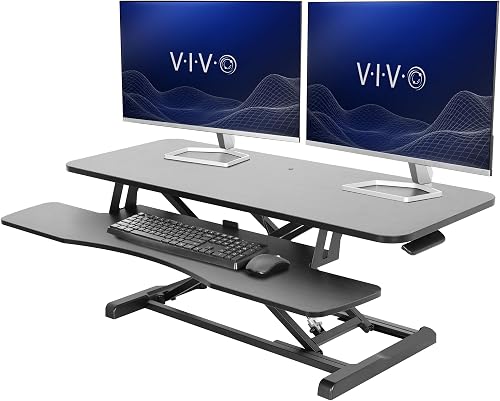
VIVO Standing Desk Converter: Best for turning a fixed desk into a standing station
- 42 x 15.7 in top
- Keyboard tray rises with the top
- Height range 4.5 to 20 in
- 33 lb top load
A riser that sits on your current desk and lifts both screens to standing height in one motion. The keyboard tray moves with it so your arms stay at the right level.
Pros
- No new desk needed
- Keyboard tray rises in sync
- Minimal assembly
Cons
- Top is 15.7 in deep
- Raises by hand rather than motor
VIVO's riser suits renters, small home offices and anyone not ready to replace a desk. Set it on the existing surface, attach the keyboard tray and you have a standing station in minutes.
The top measures 42 x 15.7 inches and holds up to 33 lb, which covers two monitors. The 42 x 11.8 inch keyboard tray (10.2 inches at the center) rises in sync with the top, so your arms don't drop when you stand.
The lift runs from 4.5 to 20 inches using a touch lock and lift assist. It's a hand lift, not a motor, so there is no preset to tap and you set the height yourself each time.
The trade-off is clear against the electric desks: they change height at a button, so switching during the day is quick and repeated.
The shallow 15.7 inch depth is the bigger issue: two large screens sit close to your face. For a deeper dual monitor setup with room to spread out, read our guide to the best computer desk for 2 monitors and laptop.
Claiks Electric Height Adjustable Standing Desk: Best for a warm wood finish
- 48 x 24 in dual-panel top
- Height range 28.3 to 46.5 in
- Three memory presets
- Cable management hub and hook
An electric desk in a rustic brown finish with a cable hub and hook built in. The 48 inch top fits two screens with room for a lamp or plant at the edges.
Pros
- Rustic brown top breaks up an all-black office
- Cable management hub included
- Three saved heights
Cons
- Top is split into two panels
- Frame finish is black only
Claiks suits a room where black desks feel cold. The rustic brown top warms up a home office while the black steel legs keep it looking tidy.
It spans 48 x 24 inches across a dual-panel top. Height runs from 28.3 to 46.5 inches with three preset buttons for seated and standing positions.
A cable management hub and hook come with the desk, so monitor and power leads have a place to gather. The frame is rated for 176 lb and the mitre-jointed legs are rounded, which softens the edges at knee height.
Assembly comes with a manual, a video guide, embedded screw hole locations and a wrench. All the tools you need are in the box, though Claiks notes a power screwdriver speeds up the job.
The split top is the main trade-off; the line between the panels can catch small items. Buy it for the finish first, dual monitor use second.
Veken 47.2 Inch Large Electric Standing Desk: Best for cable-heavy dual monitor rigs
- 47.2 x 24 in top
- Height range 28.3 to 46.5 in
- Memory presets and sedentary reminder
- Built-in cable management
A brown-top electric desk with cable management built in and a quiet motor. The 47.2 inch surface holds two screens while keeping monitor and power cables organized.
Pros
- Cable management built into the desk
- Quiet motor under 52 dB
- Sedentary reminder
Cons
- Top is made from two boards
- Width is a touch under 48 in
Veken suits a rig with lots of cables. Built-in cable management takes monitor, keyboard and power leads off the surface and down through the frame, and cable clips and a headphone hook come in the box.
The 47.2 x 24 inch top holds two screens with room at the edges. Height moves from 28.3 to 46.5 inches, and memory presets plus a sedentary reminder help you switch between sitting and standing through the day.
The motor runs under 52 dB, so height changes don't cut into calls. The brown laminated finish reads warmer than plain black, and four feet pads protect the floor.
The top comes as two boards, and the width is a fraction under 48 inches. Against the FLEXISPOT it trades the one-piece surface for cable management and the reminder.
Buy it if cable clutter is your main daily annoyance.
Monomi 48"x24“ Electric Height Adjustable Standing Desk: Best for sharing a desk between people
- 48 x 24 in desktop
- Height range 28.35 to 46.46 in
- Three memory presets and anti-collision
- Four lockable casters
A 48 inch electric desk on lockable casters with three saved heights and an anti-collision stop. Move it out of the way for cleaning, then roll it back to your spot.
Pros
- Lockable casters for easy repositioning
- Anti-collision safety stop
- 178 lb capacity
Cons
- Height range stops at 46.46 in
- Wheels add height to the desk
Monomi suits a desk that two people share. Three saved heights cover different seated and standing positions, so each person gets their own preset.
The 48 x 24 inch top carries up to 178 lb. Four lockable casters let you roll the desk aside for cleaning or a room reconfiguration, then lock it in place again.
An anti-collision system stops and reverses the desk when it meets an obstruction on the way down, which matters in a home with kids or pets. The motor runs below 45 dB, quiet enough for a shared office.
The low-VOC desktop is a plus if you are sensitive to odors from new furniture. The trade-offs are height and wheels: the range tops out at 46.46 inches, a little short for very tall users, and the casters add height to every position.
For a wider shared setup, see our roundup of the best two person computer desk options.
FEZIBO Standing Desk 48 × 24 Inch: Best for a lighter budget
- 47.2 x 23.6 in top
- Height range 28.3 to 46.5 in
- Three memory presets
- Motor rated for 50,000 lift cycles
A maple-top electric desk that covers the dual monitor basics without extras. The motor is rated for 50,000 lift cycles and runs under 45 dB.
Pros
- Low-noise motor under 45 dB
- Three memory presets
- Maple finish option
Cons
- Top is split rather than one piece
- Slightly narrower than 48 in
FEZIBO suits a buyer who wants the dual monitor basics at a lower price tier. It covers 47.2 x 23.6 inches and moves from 28.3 to 46.5 inches with three memory presets.
The motor is rated for 50,000 lift cycles and runs under 45 dB, which compares well with the quietest desks here. The FSC-certified top comes in maple and several other finishes.
It holds up to 176 lb on a reinforced steel frame. Most components come pre-assembled, and FEZIBO puts setup at about 30 minutes with the manual and video guide.
The surface is slightly narrower than 48 inches, and the top is spliced rather than one piece. Those are small differences that don't change daily use much, but they explain the lower position on this list.
Buy it if you want a quiet, steady dual monitor desk without extras you won't use. For a very tall user, choose a desk whose range reaches higher.
FITUEYES Height Adjustable Standing Desk 32” Wide: Best for a compact corner
- 31.5 x 15.7 in top
- Height range 4.3 to 19.8 in
- Dual gas spring lift
- 33 lb load
A small riser for a narrow desk where two monitors need to share one surface. Dual gas springs lift it smoothly and the touch lock holds your chosen height.
Pros
- Fits a 32 inch wide footprint
- Smooth dual gas spring lift
- Raises to 19.8 in
Cons
- Tight for two large screens
- Hand lift only
FITUEYES suits a narrow desk or corner where there's no room for a full standing desk. The 31.5 x 15.7 inch top is rated for 33 lb and takes a dual monitor pair or a monitor plus laptop.
Dual gas springs lift it smoothly from 4.3 to 19.8 inches, and a touch lock holds the height you pick. The base stays put on the existing desk, and assembly is simple.
The width is the trade-off: two 27 inch screens sit close together, and the shallow depth pushes them near your face. Measure your screens before you choose it.
Against the larger VIVO converter, the FITUEYES saves about 10 inches of width, which is the whole point of a compact riser. The cost is the space between screens.
Buy it for a compact standing setup in a small room, not for a wide dual monitor spread. A monitor arm on a deeper desk will feel more comfortable.
How the two-monitor standing desks compare
The FLEXISPOT EN1 leads on surface quality and saved heights, while the COMHOMA adds storage and built-in screen support. The VIVO arm and the two risers serve people who already own a desk.
| Product | Best for | Screen range | Load | Base | Our score |
|---|---|---|---|---|---|
| VIVO STAND-V002F Dual LED LCD Monitor Free-Standing | adding two monitors to a desk you already own | 13 to 27 in | 22 lb per screen | 13 x 10.5 in freestanding | 9.7 |
| FLEXISPOT EN1 One-Piece Standing Desk | overall | 9.7 | |||
| COMHOMA Electric Standing Desk with Drawers | a tidy dual monitor desk | 9.7 | |||
| VIVO Standing Desk Converter | turning a fixed desk into a standing station | 9.6 | |||
| Claiks Electric Height Adjustable Standing Desk | a warm wood finish | 9.4 | |||
| Veken 47.2 Inch Large Electric Standing Desk | cable-heavy dual monitor rigs | 9.1 | |||
| Monomi 48"x24“ Electric Height Adjustable Standing Desk | sharing a desk between people | 8.9 | |||
| FEZIBO Standing Desk 48 × 24 Inch | a lighter budget | 8.7 | |||
| FITUEYES Height Adjustable Standing Desk 32” Wide | a compact corner | 8.2 |
How we compared these dual monitor desks
We started with the width each desk offers for two screens. A 48 inch top fits two typical monitors side by side, so anything narrower went into the compact group.
Next we checked the height range against standing eye level. A range that reaches about 46 inches covers most users between roughly 5 ft 2 in and 6 ft 3 in.
We then weighed stability and capacity, looking for steel frames rated around 176 lb. A dual monitor setup with an arm adds real weight, so headroom matters.
Cable management, presets and extra features came last. They make daily use easier but don't change whether a desk fits two monitors.
Our score weighs specs, features and how well each product fits what a dual monitor buyer wants.
Why desk width matters more than preset count
Two 27 inch screens sit roughly 50 inches wide with a small gap between them, so a 48 inch top is the practical line between a comfortable dual setup and a cramped one.
Presets and cable hubs are pleasant extras, but they cannot fix a top that is too narrow. That is why the 47.2 and 47.24 inch desks sit just below the true 48 inch tops.
Why the risers land where they do
The VIVO and FITUEYES risers cost a fraction of a full desk and need no change to the room. They also keep the existing desk, which matters if the desk matches the furniture.
Their limits are surface depth and a hand lift. The VIVO top is 15.7 inches deep and the FITUEYES is the same, which places two screens closer than a 24 inch desk does.
The scoring reflects that.
What to check before you buy a standing desk for two monitors
Start with the width of your screens and the depth of your room. A desk that's wide enough but too deep can crowd a small office, and a shallow top pushes monitors close to your face.
How wide should the desktop be for two monitors?
Measure your two screens first. Two 27 inch monitors placed side by side need a top around 48 inches wide to leave a gap between them.
If your screens are 24 inches or smaller, a 47 inch top gives more breathing room. Anything under 45 inches means the screens sit edge to edge.
Shallow tops are a separate limit. A desk 24 inches deep keeps screens at a comfortable distance and leaves space in front of the keyboard.
The risers here are 15.7 inches deep, so they trade that room for a small footprint.
What height range fits most people?
Look for a range that reaches about 46 inches at the top. That covers most standing users, and the low end around 28 inches suits seated work.
Check the highest position against your own standing eye level, since the screen top should sit near your eyes when you stand. Save your preferred height as a preset so you can return to it.
There is a floor to watch too. The FLEXISPOT starts at 28.9 inches, which is a touch high for short seated users, while the COMHOMA goes down to 28.3 and up to 48.
Does a standing desk for two monitors need a monitor arm?
Not always. If the desk reaches your standing height and the built-in monitor stands are tall enough, two screens sit fine on the desktop.
An arm helps when the stands are short or when you want desk space under the screens. The VIVO STAND-V002F frees the surface but needs a deep base area, and its 27 inch cap rules out larger screens.
When to skip the arm
Skip it if your monitors have height adjustable stands and the desk reaches your standing eye level. A flat 48 inch top with two screens on their own feet is the simplest setup, and nothing has to be clamped or weighted.
Skip it too if your desk is shallow. The freestanding base needs a clear patch at the back, and on a 24 inch deep desk with two screens you may run short of room.
When the arm earns its place
An arm earns its place when you want the keyboard area clear or the screens angled toward you at standing height. It also helps on a fixed desk, because the arm lifts the screens while the desktop stays where it is.
If your desk wobbles, read our guide on how to fix a wobbly desk before adding an arm, since extra weight up high makes a weak frame worse.
Should you plan for a third screen later?
A 48 inch top leaves little room for a third monitor unless you stack or angle them. If a third screen is likely, plan for a 55 inch or wider desk now.
Our guide to the computer desk for 3 monitors covers the wider layouts that keep three screens in view without crowding.
Planning ahead also changes the desk type. An electric desk with a 55 inch top and a 176 lb frame gives you room to grow, while a 32 inch riser has no spare width at all.
If you are unsure, measure the desk you have and add the width of one more screen. If the total passes 48 inches, buy the wider desk now rather than later.
How much weight should the desk carry?
Allow for two monitors plus a monitor arm. A pair of typical screens weighs around 20 to 30 lb, and an arm adds a few more pounds.
A desk rated near 176 lb leaves plenty of headroom for the rest of your gear. Keep the heavier items toward the center of the top.
The risers are the tight spot. Both the VIVO and FITUEYES tops are rated for 33 lb, which covers two ordinary monitors but leaves little margin for a heavy screen plus a laptop.
Check the weight of each screen before you buy.
The capacity figures here cluster: 176 lb on most desks, 178 on the Monomi. That headroom is what lets you add an arm without worrying about the frame.
Do memory presets matter with two monitors?
They help if you switch between sitting and standing more than once a day. With two screens to reposition, returning to a saved height saves time and keeps your setup consistent.
Three or four presets are enough for one person, and four suit a shared desk. A reminder to stand can also help you use the range instead of staying seated.
What to look for in the controller
A simple up and down pair is fine for occasional use. A panel with numbered presets lets you jump straight to your two heights, which is the point of an electric desk.
The COMHOMA and Claiks use three presets, the FLEXISPOT uses four. The Monomi's three presets work well for a shared desk, where each person saves their own standing height.
When presets are not worth paying for
If you stand once in the morning and sit the rest of the day, a preset saves a few seconds and little else. The same goes for a riser you lift by hand, where the touch lock holds the height and a preset has nowhere to live.
The best standing desk for 2 monitors: final verdict
Pick the FLEXISPOT EN1 for the best dual monitor desk overall, thanks to its one-piece 48 x 24 inch top and four saved heights. The smooth surface and 176 lb capacity handle two screens and an arm without fuss.
Choose the VIVO STAND-V002F arm if your current desk already works and you only need the screens lifted. Go with the COMHOMA if you want a drawer and built-in screen stands, or the FITUEYES riser for a compact corner.
Either way, the best standing desk for 2 monitors is the one whose width fits your screens and whose height range meets your standing eye level. Measure both before you buy.
Our top 3 picks at a glance
-
1
Best for adding two monitors to a desk you already own
VIVO STAND-V002F Dual LED LCD Monitor Free-Standing
9.7/10 our score
See it on Amazon -
2
-
3
Best for a tidy dual monitor desk
COMHOMA Electric Standing Desk with Drawers
9.7/10 our score
See it on Amazon
Frequently asked questions
How wide should a standing desk be for two monitors?
A 48 inch wide top is the practical minimum for two 24 to 27 inch screens side by side. Leave about 2 to 3 inches between the screens and keep the outer edges on the desk.
A 55 inch top gives more breathing room if you also keep a laptop or reference material on the surface.
Is a standing desk converter enough for two monitors?
It can be, when the riser top is wide enough. The VIVO converter has a 42 inch top rated for 33 lb, which suits two typical monitors.
A full electric desk gives you more surface and a motor instead of a hand lift, so it scales better if you plan to add a third screen.
What height should a standing desk reach for two monitors?
Set the desk so the top of each screen sits near eye level when you stand. A range that reaches about 46 in suits most people between roughly 5 ft 2 in and 6 ft 3 in.
Save your standing height as a preset so you can return to it without guessing.
Do I need a monitor arm if my standing desk is tall enough?
Not always. If the desk reaches your standing eye level and the screens sit on their own stands, the arm is optional.
An arm helps when the built-in stands are short or when you want to free desk space underneath the screens for a keyboard and notes.
Will two monitors make a standing desk wobble?
Wobble depends more on the frame than the screens. A steel frame rated around 176 lb stays steady with two monitors at full height.
Keep the load centered and avoid pulling a freestanding arm too far forward, which shifts weight toward the front edge.