9 Best Office Desk for Multiple Monitors (November 2026)
The best office desks for dual and triple monitor setups include the COMHOMA Electric Standing Desk with Drawers for most multi-monitor setups, the Casaottima 63 Inch L Shaped Electric Standing for corner setups, and the Grandder 55x32 Extra-Deep Electric Standing Desk for ultrawide and deep screens.
On this page (4 sections)
The best office desk for multiple monitors for most people is the COMHOMA Electric Standing Desk with Drawers. Its monitor shelf and adjustable laptop stand lift screens toward eye level, and the motor moves the whole desk between 28.3 and 48 in.
If you run an ultrawide, the extra-deep Grandder puts the screen at a comfortable distance instead of in your face. Corner workers and shared rooms have their own picks below.
Monitor count drives this choice more than style does. Two 24 in screens and a laptop need width; a 49 in curved screen needs depth.
Our large computer desk guide covers the wide and deep end of the market in more detail.
Our picks at a glance
-
1
 Best for most multi-monitor setups
COMHOMA Electric Standing Desk with Drawers
9.7/10 our score
See it on Amazon -
2
 Best for corner setups
Casaottima 63 Inch L Shaped Electric Standing
9.6/10 our score
See it on Amazon -
3
 Best for ultrawide and deep screens
Grandder 55x32 Extra-Deep Electric Standing Desk
9.4/10 our score
See it on Amazon
- 4
 Best budget pickCheck it
- 5
 Check it
SEDETA Farmhouse L Shaped Desk
Best for storage and style - 6
 Check it
Arozzi Arena Ultrawide Curved Gaming and Office
Best for curved monitor owners - 7
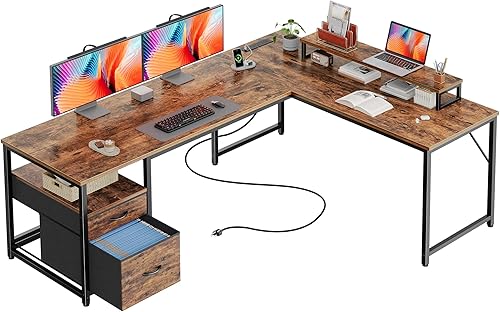 Best for charging and paperworkCheck it
- 8
 Check it
Tribesigns Two-Person Desk with Monitor Stand
Best for two-monitor pairs and shared rooms - 9
 Best for convertible corner or long deskCheck it
The best office desks for multiple monitors, ranked
The top pick suits the most common two-monitor plus laptop setup. Each desk below wins on a specific need, from ultrawide depth to shared seating, so match your screens to the right one.
COMHOMA Electric Standing Desk with Drawers: Best for most multi-monitor setups
- Height range 28.3 to 48 in
- Built-in monitor shelf and adjustable laptop stand
- Three memory presets
- 176 lb capacity
A monitor shelf plus a height-adjustable laptop stand put two screens at different heights without extra arms. The electric frame moves the whole surface for sit-stand work.
Pros
- Monitor shelf raises a screen toward eye level
- Adjustable laptop stand suits a laptop plus monitor
- Drawer and hooks keep small gear off the desktop
Cons
- 48 in width leaves little room for three monitors
- 24 in depth is the shallowest pick here
COMHOMA suits the most common home office: one large monitor, a laptop and a second screen on the shelf. The monitor shelf raises the top screen toward eye level, and the adjustable laptop stand lets you set lower-screen height up or down to suit your workflow, which eases strain on the back and neck.
The motor runs from 28.3 to 48 in with three memory presets on an LED control panel, so a sit-stand routine takes one button. That 48 in top height is the tallest travel in this group, which matters if you are tall and want a true standing posture.
Under the top, a pull-out utility drawer on ball bearing glides holds pens, chargers and a notebook, and two hooks take a headset or bag. A T-shaped steel frame supports the top.
That frame holds 176 lb, and COMHOMA puts the lift under 55 dB for quiet rooms. The top is FSC-certified wood in an ivory white finish with a scratch-resistant surface, and tools and instructions ship in the box with a setup video online.
The 48 x 24 in top is the trade-off: wide enough for two screens and a laptop, tight for three monitors. Pick it for a two-screen sit-stand setup and plan a wider top if you need a third.
Casaottima 63 Inch L Shaped Electric Standing: Best for corner setups
- Reversible L shape for left or right return
- Height range 28.4 to 45.7 in
- Memory keypad
- Reinforced frame
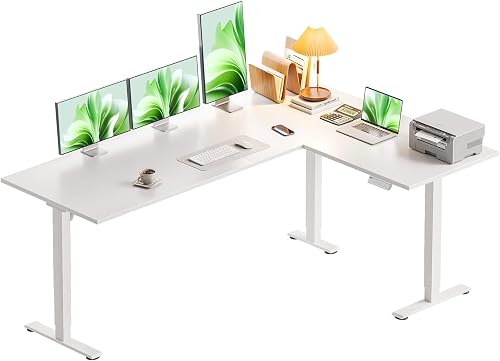
The L shape wraps two walls of a corner, so monitors can run along one leg and a laptop or second task can sit on the return. The return installs on either side.
Pros
- Two work zones on one footprint
- Reversible return fits either corner
- Raises and lowers with memory presets
Cons
- Needs a corner or open wall to set up
- Shorter lifting range than the COMHOMA
Casaottima fits a room corner where two-screen work runs along one wall and paperwork sits on the return. The L layout gives you a long main run for monitors and a side wing for a laptop, printer or writing work, and the frame uses carbon steel legs.
You choose which side the return goes on, so the shape fits either corner of a room. The electric frame lifts from 28.4 to 45.7 in with a memory keypad, which is shorter travel than the COMHOMA but still covers seated and standing heights for most people.
The keypad stores height settings so you return to the same sitting or standing spot without holding the button.
A reinforced carbon steel frame and lifting system keep the desk steady at different heights, and clear part labeling plus an optional video make assembly manageable. The engineered wood top comes in a polished white finish, and a headphone hook is included.
A 63 in L gives monitors a longer run than the COMHOMA's 48 in, but the depth of the two legs means a corner plan before you order.
The corner footprint is the trade-off against a plain rectangular top: it uses two walls, so it needs an actual corner or an open L of space. Best for a corner office with two screens and a side task zone.
Grandder 55x32 Extra-Deep Electric Standing Desk: Best for ultrawide and deep screens
- 31.5 in deep top
- Two memory presets
- Anti-collision stop
- 176 lb capacity
An extra-deep top gives a wide curved monitor the viewing distance it needs, with room for a keyboard and speakers in front of it. The electric frame moves the whole setup between sitting and standing.
Pros
- Depth leaves space between screen and eyes
- Holds an ultrawide plus a second screen
- Anti-collision stops the desk on obstacles
Cons
- 55 in wide leaves little side space
- Two memory presets instead of three
Grandder is the desk for a wide curved monitor. At 31.5 in deep, it gives a 49 in ultrawide the viewing distance it needs while leaving room for a keyboard, mouse and speakers in front.
Standard 24 to 28 in desks force you either too close to a curved screen or holding the keyboard at an odd angle.
The 55 in width takes an ultrawide plus a second screen for many setups, and the 176 lb industrial-grade steel frame with T-shaped legs is built around heavy daily use. Height runs from 28 to 45.6 in with two memory presets on the smart control panel.
The electric lift stops and reverses when it meets an obstacle, which protects a monitor arm or a file cabinet underneath. Grandder says the motor runs under 45 dB, quieter than most, and the frame is tested to 55,000 lift cycles.
The top is engineered wood with an oak laminate in two panels.
The trade-off is width: 55 in leaves little room for a third screen. Choose it for one big curved display or a deep dual setup.
Huuger Computer Desk: Best budget pick
- Reinforced struts under the top
- 54 in wide surface
- Multiple color options
- Simple assembly
A wide fixed-height top at a low price point gives two monitors and a laptop somewhere to sit. The shallow depth suits screens placed close rather than ultrawides.
Pros
- Wide surface for the money
- Steel frame with support struts
- Fits a study, bedroom or kids room
Cons
- Fixed height means no sit-stand switch
- 19.7 in depth pushes you close to the screens
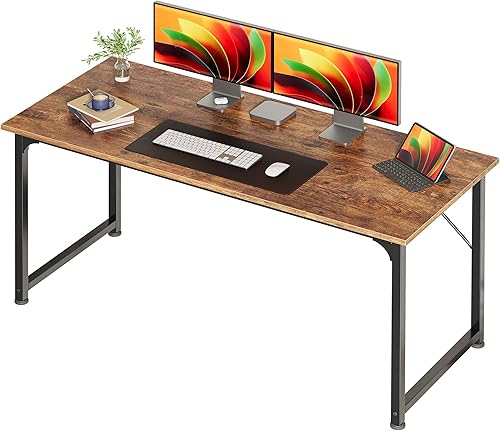
Huuger is the low-cost way to get two monitors and a laptop onto one wide surface. The 54 x 19.7 in top and a steel frame with reinforcement struts under the tabletop keep the whole thing steady for writing and browsing.
This is a fixed-height desk at 29.5 in, so it suits a setup you won't raise and lower during the day. The 19.7 in depth is the real limit: two standard monitors sit close to your eyes unless you push them back and work with a keyboard tray.
Five color options, including the rustic brown shown, help it blend into a bedroom or study, and assembly runs to under 40 minutes with the included tools and visual instructions. The particleboard top holds a computer, lamp, calendar and paperwork without crowding.
At 21 lb it is also the lightest desk here, so one person can move it alone when a room gets rearranged.
Pick it when budget and width matter most and you don't need a standing position. For three screens, move up to a deeper L desk instead.
SEDETA Farmhouse L Shaped Desk: Best for storage and style
- Monitor shelf
- File and box drawers
- 2 outlets and 2 USB ports
- RGB light strip
A fixed-height L desk with a monitor shelf and drawers that keep paperwork and small office gear out of the monitor zone. A built-in power strip feeds a laptop and lamps.
Pros
- Monitor shelf frees desktop under the screen
- Filing drawer holds three paper sizes
- Outlets and USB ports on the desk
Cons
- Fixed height
- Decor-heavy design may not suit a plain office
SEDETA's farmhouse L desk suits a home office where the desk is also furniture. The monitor shelf raises a screen and frees desktop space underneath for a keyboard and notebook, and the L shape opens two work zones.
Two drawers matter for multi-monitor work: a file drawer takes legal, letter and A4 documents, and a box drawer handles small items. A power strip with two outlets and two USB ports feeds a laptop, monitor power bricks and a lamp without a floor cable run.
A finished brown top in a farmhouse style, an RGB light strip with app control and numbered parts round it out. The RGB strip offers a wide color range and flashing modes with music sync, so the desk can double as a gaming spot after hours.
At 79 lb it is a heavy piece for the fixed-height group, so plan a second pair of hands for setup.
The desk is fixed at 34.4 in, which is a comfortable height for many seated workers but not adjustable. The styled finish is the trade-off if you prefer a plain office.
Best when storage and a styled room matter as much as screen space.
Arozzi Arena Ultrawide Curved Gaming and Office: Best for curved monitor owners
- Full-surface washable desk mat
- Three monitor mount cutouts with a cable basket
- Height adjustable up to 3.9 in
- 176 lb capacity
A curved front and a full-surface mat suit a wide curved screen, and the mount cutouts let monitor arms sink to desk level with cables collected in a basket.
Pros
- Cutouts and cable basket tidy up arms
- Washable full-surface mat
- Height trims adjust to your chair
Cons
- Fixed-height frame, not a sit-stand desk
- Curved shape needs a small planning step
Arozzi suits a curved monitor owner who wants monitor arms tucked away. Three mount cutouts along the back let arms drop through the top, and a cable management basket under the desk collects the slack.
The result is screens floating over a flat surface instead of sitting on stands.
The full-surface mat is water-resistant and machine washable, so coffee spills and dust come off in one go. Steel tubular legs hold 176 lb, and the frame trims height by up to 3.9 in to line the desk up with your chair.
The desk is BIFMA certified. A curved front edge means the mat wraps around you rather than sitting square, which some people love and others find awkward for a straight keyboard and mouse run.
It is not a sit-stand desk: the height adjustment is a one-time setup, not a daily lift. The curved front and mat are a taste call too.
Pick it for arms and a curved screen, not for standing work.
PRAISUN 63 Inch L Shaped Desk: Best for charging and paperwork
- 4 outlets, USB-C and USB-A on the desk
- Movable monitor stand
- Fabric file drawer
- Reversible L shape
Charging ports sit on the desktop, and the monitor stand lifts a screen to eye level. The L shape gives two monitors a long run along the main desk.
Pros
- USB-C and four outlets built in
- Monitor stand moves to main or side top
- File drawer keeps documents handy
Cons
- Fixed height
- Fabric drawers feel lighter than wood boxes
PRAISUN suits a freelancer or teacher whose desk doubles as a charging station. Four AC outlets, a USB-C port and a USB-A port sit on the desktop, so a laptop, tablet and phone charge without a power strip on the floor.
The USB-C port is the difference from the other desks here, and it suits newer laptops and phones that charge from that plug.
The 18.9 in deep main desk and side table form the L, and the raised monitor shelf can go on the main or side top. That lets you raise a screen to eye level in either spot.
A 63 in L shape gives two monitors a long run along the main desk.
A fabric file drawer with a hanging bar keeps A4 and letter folders within reach, and an open shelf handles the rest. The particleboard top is FSC-certified and reinforced steel tubing with a rear crossbar adds stability.
The open space under the side desk gives your legs room to stretch or space for a small pet bed.
The desk is fixed at 29.7 in and the fabric drawers are lighter than wood boxes. Best for a wired-up corner with two screens and a filing habit.
Tribesigns Two-Person Desk with Monitor Stand: Best for two-monitor pairs and shared rooms
- 78.74 in long surface
- Two monitor stands
- Four open shelves
- 350 lb capacity
Two workspaces share one long top, so each person can run two monitors with a stand raising the screens. Open shelves below each seat hold CPUs and supplies.
Pros
- Each half has its own monitor stand
- Space for two full setups side by side
- Shelves keep CPUs off the floor space
Cons
- Fixed height
- Needs a long wall or open room
Tribesigns solves a different problem: two people with two monitors each, or one person spread across two full setups. The top runs 78.74 in long by 27.56 in deep, which seats two side by side without crowding either seat.
A single worker could also run three monitors along part of it and keep the rest for a laptop and paperwork.
Each half gets its own monitor stand, so both occupants raise a screen to a comfortable height. Four open shelves, two under each seat, hold CPUs and supplies and leave legroom clear.
The two-tier layout on each side puts books and small gear up top and a CPU tower below.
The metal frame holds 350 lb, roughly double the single-desk picks, and adjustable leg pads keep it level on uneven floors. The engineered wood top is wear-resistant and the rustic brown finish pairs with a black steel frame.
This is a fixed-height desk at 35.83 in, so it doesn't sit-stand. Best for a shared home office or study room where each person has one or two screens.
SEDETA L Shaped Gaming Desk: Best for convertible corner or long desk
- Reversible to a 96 in long desk
- Power strip with 4 outlets and 2 USB
- Monitor stand and keyboard tray
- 3-tier shelving
The same frame can sit as a corner L or straighten into a long desk that holds three monitors in one run. A monitor stand and keyboard tray free desktop space.
Pros
- Converts between corner and long layout
- Power strip for several devices
- Pegboard and shelves for cables and tools
Cons
- Heaviest build to move into place
- Lowest score here on features for the price of assembly time
SEDETA's gaming desk flips between two layouts. Set it as a 59 in corner L for a tight room, or straighten it into a 96 in long desk that runs three monitors in one row.
That flexibility sets it apart from every fixed-shape desk above.
A monitor stand and keyboard tray free desktop space, and a power strip with four outlets and two USB ports covers monitors, a PC and a lamp, with an on-off switch for a one-button cut. Three-tier shelving, a pegboard and a storage bag handle cables, tools and small gear.
The keyboard tray fits a full 108-key or compact 87-key board. The shelving can move to the left or right, so the storage side follows your room rather than forcing it.
The RGB strip offers many colors and flashing modes with music sync. The desk is fixed at 35.4 in (27 in at the lowest point of the frame design), so it doesn't adjust for daily standing.
Assembly is the main cost in time because the frame is big and the parts list is long. Choose it when your monitor count might grow and you want one desk that can grow with it.
How these desks were compared
We compared the desks on the specs that decide a multi-monitor setup: usable width and depth, lifting range, frame material and capacity, storage and cable features. Screen count and screen size were the starting filter, because a 55 in top and a 63 in L solve different problems.
Width matters for three screens, depth matters for one wide curved screen, and frame capacity matters once arms and heavy displays push down on the top. Storage, outlets and cable routing matter more than they look too, since a multi-screen desk collects power bricks, hubs and loose cables.
We kept fixed-height and motorized desks in separate lanes rather than letting one type win by default. A fixed desk with the right width beats a motorized desk that crowds three screens.
Our score weighs those specs, features and how well each desk fits what a multi-screen buyer needs day to day.
| Product | Best for | Desktop size | Height range | Lift capacity | Our score |
|---|---|---|---|---|---|
| COMHOMA Electric Standing Desk with Drawers | most multi-monitor setups | 48 x 24 in | 28.3 to 48 in | 176 lb | 9.7 |
| Casaottima 63 Inch L Shaped Electric Standing | corner setups | 63 in wide L shape | 28.4 to 45.7 in | 9.6 | |
| Grandder 55x32 Extra-Deep Electric Standing Desk | ultrawide and deep screens | 55 x 31.5 in | 28 to 45.6 in | 176 lb | 9.4 |
| Huuger Computer Desk | budget pick | 54 x 19.7 in | 9.3 | ||
| SEDETA Farmhouse L Shaped Desk | storage and style | 9.0 | |||
| Arozzi Arena Ultrawide Curved Gaming and Office | curved monitor owners | 63 in wide | 8.8 | ||
| PRAISUN 63 Inch L Shaped Desk | charging and paperwork | 8.1 | |||
| Tribesigns Two-Person Desk with Monitor Stand | two-monitor pairs and shared rooms | 78.74 x 27.56 in | 8.0 | ||
| SEDETA L Shaped Gaming Desk | convertible corner or long desk | 27 to 35.4 in | 7.9 |
What matters most for the best desk for multiple monitors?
Depth first, then width, then stability, then height control. Most buyers over-index on width and end up too close to their screens.
Depth decides viewing distance. Width decides how many screens fit in a row.
Stability keeps screens from shaking when you type or lean. Height control decides whether you can stand without rebuilding the setup.
How deep should a multi-monitor desk be?
Aim for 28 to 32 in of depth for two or more screens. That puts a monitor 20 to 24 in from your eyes, which is a comfortable focus distance for most people.
A 24 in top works when you push smaller screens back and use a narrow keyboard. A 19.7 in top will keep you close to the glass unless you add a monitor arm.
The Grandder at 31.5 in deep is the clearest fit for a wide curved monitor. The Tribesigns at 27.56 in handles a more traditional dual setup, and the Arozzi runs deep enough at its widest to place arms well back.
If you run two flat screens rather than a curve, a 24 in top like the COMHOMA's can work, but only if you keep the keyboards and screens tight to the wall.
How wide a desktop do you need for two or three monitors?
Budget about 22 to 24 in of width per standard monitor when you want a small gap between screens. Three 24 in monitors then need roughly 66 to 72 in of surface.
That is past most single-top desks here, which is why a long two-person top or a convertible long desk helps. A 48 in top fits two screens plus a laptop; a 55 in top fits two screens and a laptop; 63 in and up starts to fit a third.
If you're already mapping a three-screen layout, our computer desk for 3 monitors guide goes through widths and layouts in detail.
Do monitor shelves and arms beat plain desk space?
A monitor shelf is the simpler option; an arm gives more freedom. The shelf needs no clamp and works on any top, while an arm frees the desk surface underneath.
Shelves on the COMHOMA and PRAISUN raise a screen with the frame they're mounted to. That means the shelf moves with the desk when it stands, which keeps your monitor height consistent.
Arms need a sturdy top to clamp or a cutout like the Arozzi's. They give more adjustability but add setup time and a weight load on the desktop.
An arm also needs the monitor's VESA pattern, so check the screen before you buy one.
How does a sit-stand frame handle a multi-monitor setup?
A sit-stand frame lifts the desk, monitors and all, so screen height follows you as you move. That is simpler than lifting a monitor separately, as long as cables have slack for the full range.
The COMHOMA, Casaottima and Grandder all move the whole surface. Our guide to the best standing desk for 2 monitors covers the cable slack and stability side of standing work.
A velcro tie or a cable spine under the top keeps monitor leads from snagging as the desk rises.
The fixed-height desks here, from Huuger to Tribesigns, suit buyers who sit all day and want width or storage instead of a motor.
What keeps a multi-monitor desk steady?
A steel frame, a stated capacity above 150 lb and support struts or a crossbar do the steadying. Every desk here lists a steel, metal or wood base, and several give a capacity figure.
A long or L top can flex in the middle, so a support leg or rear crossbar helps. The Grandder frame is tested to 55,000 lift cycles, the PRAISUN uses a rear crossbar, and the Tribesigns uses adjustable pads for uneven floors.
If your current desk already shakes, our guide to how to fix a wobbly desk covers tightening, shimming and adding braces before you replace it.
Should you buy a motorized desk or a fixed one?
Buy motorized if you work long days and want to switch posture; buy fixed if width and storage matter more. The motor adds cost and a moving part, and a fixed top gives you more surface per dollar.
Motorized picks here start with the COMHOMA at 9.7 and run through the Grandder and Casaottima. Fixed picks run from the Huuger budget desk to the Tribesigns shared desk.
The motorized desks also vary on travel: the COMHOMA goes to 48 in, the Casaottima to 45.7 in, and the Grandder to 45.6 in. Taller users should check the top height against their standing posture.
Neither is wrong. Match it to whether you'll actually stand during the day.
Which multi-monitor office desk should you buy?
Pick the COMHOMA if you want one desk that does sit-stand, a monitor shelf and a laptop stand in a normal room. It's the best office desk for multiple monitors for most buyers because it treats two screens as the default setup, not an afterthought.
Pick the Grandder if you run an ultrawide and need depth. Pick the Casaottima for a corner, the Tribesigns for two people, and the SEDETA gaming desk if your monitor count might grow.
The Huuger stays the value choice for a fixed-height two-screen desk, and the Arozzi is the one to get if you want arms and a curved front. Measure your wall, your screen widths and your viewing distance before you order.
Our top 3 picks at a glance
-
1
Best for most multi-monitor setups
COMHOMA Electric Standing Desk with Drawers
9.7/10 our score
See it on Amazon -
2
Best for corner setups
Casaottima 63 Inch L Shaped Electric Standing
9.6/10 our score
See it on Amazon -
3
Best for ultrawide and deep screens
Grandder 55x32 Extra-Deep Electric Standing Desk
9.4/10 our score
See it on Amazon
Frequently asked questions
How deep should a desk be for two or three monitors?
Aim for at least 28 to 32 in of depth so a monitor sits 20 to 24 in from your eyes. A 24 in top works for smaller screens pushed back, but an ultrawide curved screen crowds a shallow desk.
Can one desk hold three monitors side by side?
Yes, if the surface runs about 60 in or more. A 63 in wide top fits three 24 in screens, while a 55 in top handles two comfortably.
Check monitor width plus the gap between screens.
Do I need a monitor arm or a desk shelf?
A shelf or stand raises a screen without clamping the desk edge, so it works on thin and glass tops. A monitor arm gives more freedom but needs a sturdy top to clamp to.
Is a standing desk worth it for a multi-monitor setup?
Yes if you work long sessions and want to switch posture during the day. The trade-off is chair and cable planning: a standing height setting changes monitor height, so adjust arm or shelf height once.
Will a dual-monitor desk wobble with heavy screens?
A steel frame with a stated capacity above 150 lb keeps a two-monitor setup steady. Long shared tops can flex in the middle, so check for a support leg or crossbar.