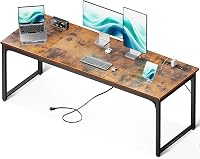
9 Best Computer Desks for Two Monitors and a Laptop (November 2026)
The best computer desks for two monitors and a laptop include the COMHOMA Electric Standing Desk with Drawers (best overall), the VASAGLE Computer Desk for a fixed-height budget setup, and the Grandder 55x32 Extra-Deep Electric Standing Desk for ultrawide and dual-monitor depth.
On this page (5 sections)
The best computer desk for 2 monitors and a laptop is the COMHOMA Electric Standing Desk with Drawers. Its 48-inch top includes a monitor shelf and an adjustable laptop stand, so both screens and your laptop can move up and down with the desk.
That matters because the usual two-monitor-plus-laptop layout fails in one of two ways: the top is wide enough but too shallow, or the depth is fine but the screens end up at the wrong height. The desks below solve those problems in different ways, from a budget fixed-height top to a corner model with shelves and outlets.
If two people will share the space, read our guide to the best two person computer desk before you buy. For three screens instead of two, see what computer desk for 3 monitors actually fits.
And if cable clutter is your main frustration, our computer desk cable management guide covers the fixes.
Our picks at a glance
-
1

-
2

-
3
 Best for ultrawide and dual-monitor depth
Grandder 55x32 Extra-Deep Electric Standing Desk
9.4/10 our score
See it on Amazon
- 4
 Best for simple everyday setupsCheck it
- 5
 Best for screen and storage spaceCheck it
- 6
 Check it
VIVO Freestanding Dual Computer Monitor and Laptop
Best for raising screens on an existing desk - 7
 Check it
AODK 66" L Shaped Computer Desk
Best for storage-heavy screen setups - 8
 Check it
SEDETA 66" Reversible L Shaped Computer Desk
Best for corner charging and cable control - 9
 Best for a movable monitor shelfCheck it
The best computer desks for two monitors and a laptop
The top pick overall is the COMHOMA because it builds screen height into the desk. Every other pick below wins on a specific need, such as width on a budget, extra depth for large monitors, or corner storage.
COMHOMA Electric Standing Desk with Drawers: Best overall
- Electric height range 28.3 to 48 in
- Built-in monitor stand and adjustable laptop stand
- Pull-out drawer and 2 hooks
- FSC-certified wood top
A sit-stand desk that gives two monitors a raised shelf and your laptop its own adjustable stand, so the whole setup can move up and down together.
Pros
- Electric sit-stand adjustment
- Monitor shelf and laptop stand included
- Pull-out drawer keeps supplies close
Cons
- 48-inch top is the narrowest in this group
- Assembly is required
COMHOMA suits anyone who wants to alternate sitting and standing without rebuilding the screen layout each time. The electric frame moves from 28.3 to 48 inches, and the monitor shelf plus adjustable laptop stand travel with it.
The motor runs quietly enough for a shared room at under 55 dB, and the LED panel holds three memory presets so you can return to your sit and stand heights with one press. A pull-out drawer on ball bearing glides and two hooks keep pens and headphones off the work surface.
The T-shaped steel frame carries up to 176 lb and the top is FSC-certified wood. The laptop stand adjusts up and down so the screen sits near your monitor height.
The trade-off is width. At 48 inches wide by 24 inches deep, this is the narrowest top in the group, so two large monitors plus a laptop will feel tight unless the laptop sits on its stand at an angle.
The adjustable laptop stand does most of that work, raising the screen to suit your workflow rather than taking up flat surface.
Buy it for a sit-stand setup with built-in screen height. Skip it if you need more than 48 inches of clear width.
VASAGLE Computer Desk: Best for a fixed-height budget setup
- 55.1 x 19.7 in top
- Steel frame with adjustable feet
- Holds up to 110 lb
- Quick assembly with labeled parts
A wide, simple desk that gives two monitors and a laptop plenty of elbow room without paying for a motor or storage extras.
Pros
- 55 inches of width for three screens
- Adjustable feet steady it on uneven floors
- Light at 24 lb
Cons
- Fixed height only
- 19.7-inch depth leaves little room for monitor arms
VASAGLE is the pick for a fixed-height desk where width matters more than extras. The 55.1 by 19.7-inch top gives two monitors and a laptop room to sit side by side without a motor or shelf taking up space.
The steel frame holds up to 110 lb, which is plenty for two monitors, a laptop and a lamp. Adjustable feet keep it steady on slightly uneven floors and protect the floor from scratches, and the parts are labeled for quick assembly.
The particleboard top has a rustic brown finish that hides fingerprints better than a plain white surface.
The 19.7-inch depth is the main limit. A large curved monitor placed directly on this top sits closer to your eyes than you may want, so plan on a monitor arm or a stand to push screens back.
At 24 lb it is also light enough to move without help.
Buy it for a wide, simple surface at a budget price. Skip it if you want a sit-stand motor or extra depth for big monitors.
Grandder 55x32 Extra-Deep Electric Standing Desk: Best for ultrawide and dual-monitor depth
- 32-inch deep top
- Electric height range 28 to 45.6 in
- Two memory presets and anti-collision
- Holds up to 176 lb
The extra depth pushes screens to a comfortable viewing distance while leaving room for a keyboard and laptop in front.
Pros
- 32-inch depth suits large curved monitors
- Sit-stand motor with two presets
- Anti-collision stops the desk on obstacles
Cons
- Desktop arrives as two joined panels
- Costs more than fixed-height desks
Grandder is the depth pick. The 31.5-inch top is about 4 inches deeper than a standard 55-inch desk, which lets a 49-inch ultrawide or two large monitors sit at a comfortable 22 to 24 inches from your eyes with a keyboard and laptop in front.
The electric frame runs from 28 to 45.6 inches with two memory presets, and anti-collision stops and reverses the desk if it meets an obstacle on the way down. Grandder says the frame is tested through 55,000 lift cycles and carries up to 176 lb.
The motor runs under 45 dB. The oak laminate surface resists scratches and the T-shaped legs keep the frame steady under a heavy monitor.
The trade-off is the top itself. The 55-inch desktop arrives as two vertically joined panels, and the oak laminate shows that seam.
If you want a single continuous slab, this is not it. The depth also means the desk needs more floor space than the 19.7-inch models here.
Buy it for a deep, sit-stand surface for large or curved monitors. Skip it if a visible panel seam would bother you.
Huuger Computer Desk: Best for simple everyday setups
- 54 x 19.7 in top
- Reinforcement struts under the top
- Five color options
- Assembly in under 40 minutes
A plain, wide work surface at a friendly price, with no motor or shelves to get in the way of a two-monitor plus laptop layout.
Pros
- 54 inches of usable width
- Reinforced steel frame
- Five finishes to match a room
Cons
- No monitor shelf or cable routing built in
- Fixed height only
Huuger covers the simple everyday case. The 54 by 19.7-inch top gives two monitors and a laptop enough width, and reinforcement struts under the surface add stability without adding shelves or a motor.
It comes in five finishes, including rustic brown and a rustic brown and black blend, so it is easy to match a room. Huuger says assembly takes under 40 minutes with the included tools.
It is the lightest desk here at 21 lb. The steel legs and particleboard top keep the price low.
The 19.7-inch depth still rewards a monitor arm over freestanding screens. At a fixed 29.5 inches tall, it suits an average seated position but not a standing one.
Buy it for a plain, wide desk at a low price. Skip it if you want a sit-stand motor.
SEDETA L Shaped Computer Desk: Best for screen and storage space
- Reversible L-shape that converts to a 96-inch double desk
- Built-in power outlets and USB ports
- Monitor shelf, keyboard tray and pegboard
- LED light strip
The corner shape separates monitor space from laptop and accessory space, and the shelves and outlets keep the surface clear.
Pros
- Corner layout spreads screens out
- Charging ports on the desk
- Pegboard and shelves for supplies
Cons
- Deep corner footprint needs room
- L-shape takes longer to assemble
SEDETA's L-shaped desk suits a corner where the two monitors and the laptop compete for space. The reversible frame can sit in either corner, and the corner layout puts the monitors along one leg while the laptop and accessories use the side.
It includes a monitor shelf, a keyboard tray, a pegboard, storage shelves and a side storage bag. The keyboard tray fits a 108-key or 87-key keyboard and leaves the surface free for screens.
There are also 4 outlets and 2 USB ports with an on-off switch, plus an RGB light strip controlled by app or remote with over 60,000 colors and 29 modes.
The same frame can convert to a 96-inch-long double desk, which is useful if a second person joins later. The monitor shelf is ergonomic and frees desktop room for a laptop.
The trade-off is floor space: an L-shape needs more room than a straight desk, and the shelves and pegboard add assembly steps. The top is FSC-certified wood.
Buy it for corner storage and built-in charging. Skip it if you have a narrow room or want a straight desk.
VIVO Freestanding Dual Computer Monitor and Laptop: Best for raising screens on an existing desk
- Fits two monitors up to 32 in and a laptop up to 17 in
- Full tilt, swivel and rotation
- Freestanding glass base needs no drilling
- Cable clips included
A stand, not a desk: it lifts two monitors and a laptop above any flat top so you can skip a monitor shelf purchase.
Pros
- No desk modification needed
- Adjustable arms for portrait or landscape
- Ventilated laptop tray helps airflow
Cons
- Adds a large base footprint to your desk
- Requires a desk deep enough for the glass base
VIVO is not a desk but a stand, and that is the point. It holds two monitors up to 32 inches and a laptop up to 17 inches on a freestanding tempered glass base, so you can add screen height to a desk you already own.
Each arm tilts from +90 to -90 degrees, swivels 180 degrees and rotates 360 degrees, so you can set portrait or landscape and fine-tune the viewing angle. The ventilated tray under the laptop helps airflow.
Cable clips keep the cords together. Height adjustment runs along the center pole, so you can raise the whole group of screens to match your eye line.
The catch is footprint. The glass base measures 15.9 by 10.2 inches and sits on your desktop, so it needs a top at least 24 inches deep to stay stable.
VIVO also advises against pulling the monitors too far forward unless the stand is secured. The monitors mount on 75x75mm or 100x100mm VESA plates that detach for easy fitting.
It carries a 3-year warranty.
Buy it to raise two monitors and a laptop on an existing desk. Skip it if your desk is shallow or you want a complete desk.
AODK 66" L Shaped Computer Desk: Best for storage-heavy screen setups
- 66-inch corner or 113-inch long layout
- File cabinet plus 4 fabric drawers
- Built-in outlets and LED light
- 47.2-inch monitor shelf and CPU stand
A long monitor shelf across the corner gives two screens a home while the drawers and cabinet swallow paperwork and supplies.
Pros
- Long monitor shelf holds two screens
- File cabinet and fabric drawers
- Converts to a long two-person desk
Cons
- Takes up a lot of floor space
- Long assembly with many parts
AODK's 66-inch corner desk puts a 47.2-inch monitor shelf across the corner, which is long enough for two monitors without crowding the laptop below. The same frame can also be set up as a 113-inch-long two-person desk.
Storage is the reason to choose it: a file cabinet with two drawers for letter, legal and A4 files, plus four fabric drawers and two under-desk shelves. There is a built-in outlet with 3 AC and 2 USB ports, and an LED light strip with a milky shell for softer light.
A CPU stand and monitor shelf keep the tower and screens off the floor.
The downside is size and assembly. This is a big piece of furniture with many parts, so set aside an afternoon and measure the corner first.
The 18.9-inch depth is shallow for large curved monitors, so the monitor shelf is doing the work of pushing screens back. Adjustable foot pads keep it steady on uneven floors.
Buy it for storage-heavy two-monitor setups. Skip it if you want a compact or easy-to-move desk.
SEDETA 66" Reversible L Shaped Computer Desk: Best for corner charging and cable control
- Reversible corner layout
- 4 outlets and 2 USB ports
- File drawer, printer shelf and CPU stand
- RGB light strip with app control
Built-in power and a file drawer make this corner desk practical for a laptop, two monitors and a printer in one spot.
Pros
- Charging ports within reach
- Printer shelf keeps gear off the desk
- Reversible for either corner
Cons
- Corner footprint is large
- LED strip is a style extra rather than a necessity
The SEDETA 66-inch reversible corner desk is the charging pick. It has 4 outlets and 2 USB ports within reach, which covers two monitors, a laptop and a printer without a power strip under your feet.
A file drawer holds letter and A4 papers, and a printer shelf keeps the printer off the work surface. There is also a CPU stand and two open shelves.
An RGB light strip with app and remote control adds a gaming look with over 60,000 colors and 29 modes. A headset hook and monitor shelf keep the surface clear for screens and a laptop.
The trade-off is that the corner footprint is large, and the RGB strip is a style extra rather than something a two-monitor setup needs. The frame is thick MDF and metal, and SEDETA says assembly takes about 30 to 40 minutes with a screwdriver.
This is a fixed-height desk, so you give up the sit-stand option in exchange for the storage and charging.
Buy it for a corner office that needs outlets and printer space. Skip it if you want a minimal desk or have limited floor space.
PRAISUN 63 Inch L Shaped Desk: Best for a movable monitor shelf
- 18.9-inch deep main desk with side table
- 4 AC outlets, USB-C and USB-A ports
- 2 fabric drawers and a file drawer
- Movable monitor stand
The raised shelf can move between the main and side surfaces, so you can raise one monitor or both where the light works best.
Pros
- Monitor stand can be repositioned
- USB-C port for newer laptops
- File drawer and fabric drawers
Cons
- 18.9-inch depth is shallow for big monitors
- Fixed height only
PRAISUN is the pick when you want to move the monitor shelf around. The raised stand can sit on the main 18.9-inch-deep desk or on the side table, so you can raise one monitor or both wherever the light and your sightline work best.
The main desk and side table form the L-shape, giving separate zones for the two monitors, the laptop and paperwork. There is a charging strip with 4 AC outlets, 1 USB-C and 1 USB-A port, plus two fabric drawers and a file drawer.
The drawer with the hanging bar keeps A4 and letter folders in reach.
The 18.9-inch depth is the limitation. A big monitor placed directly on this top sits close, so the movable stand is doing real work here.
The crossbar on the back adds stability and the open space under the side desk leaves legroom. It is also a fixed-height desk at 29.7 inches with an FSC-certified wood top.
The USB-C port is the standout, since most desks here offer only USB-A.
Buy it for a flexible monitor shelf and USB-C charging. Skip it if you need extra depth or a sit-stand motor.
How these desks compare for two monitors and a laptop
The comparison comes down to width, depth and whether screen height is built in. A 48-inch desk with a monitor shelf and a 55-inch flat desk can both work, but they suit different rooms.
| Product | Best for | Size (D x W) | Height range | Weight capacity | Our score |
|---|---|---|---|---|---|
| COMHOMA Electric Standing Desk with Drawers | overall | 24 x 48 in | 28.3 to 48 in | 176 lb | 9.7 |
| VASAGLE Computer Desk | a fixed-height budget setup | 19.7 x 55.1 in | 110 lb | 9.6 | |
| Grandder 55x32 Extra-Deep Electric Standing Desk | ultrawide and dual-monitor depth | 32 x 55 in | 28 to 45.6 in | 176 lb | 9.4 |
| Huuger Computer Desk | simple everyday setups | 19.7 x 54 in | 9.3 | ||
| SEDETA L Shaped Computer Desk | screen and storage space | 19.69 x 59 in | 9.2 | ||
| VIVO Freestanding Dual Computer Monitor and Laptop | raising screens on an existing desk | 8.8 | |||
| AODK 66" L Shaped Computer Desk | storage-heavy screen setups | 18.9 x 66 in | 8.6 | ||
| SEDETA 66" Reversible L Shaped Computer Desk | corner charging and cable control | 51.2 x 66.9 in | 8.3 | ||
| PRAISUN 63 Inch L Shaped Desk | a movable monitor shelf | 18.9 x 63 in | 8.1 |
Our score weighs specs, features and buyer feedback against what you're shopping for in a two-monitor-plus-laptop desk. Width and depth carry the most weight, then screen-height support, then storage and charging extras.
A desk that needs a separate monitor arm to work well scores lower than one that includes a shelf or stand. Fixed-height desks are not marked down for lacking a motor, but they score lower when the surface is too shallow to fix with a shelf.
What separates a sit-stand desk from a fixed-height desk here?
The two electric models, the COMHOMA and the Grandder, let you change posture through the day. The COMHOMA tops out at 48 inches and includes a monitor shelf and laptop stand, while the Grandder goes to 45.6 inches and offers more depth.
Everything else on this list is fixed height. A fixed-height desk costs less and is lighter to move, but you cannot switch from sitting to standing without leaving your spot.
If you only work seated and already have your screen heights worked out, a fixed-height desk is the simpler buy.
How these were compared
We started with desks whose listed width and depth can physically fit two monitors and a laptop. A 48-inch top qualifies when it has a monitor shelf or laptop stand, and a 55-inch or wider flat top qualifies on width alone.
Depth was the second filter. Desks under 20 inches deep were kept only when a stand or arm could compensate.
We also checked whether the desk includes a monitor shelf, a laptop stand or charging ports, since those decide how much extra gear you need to buy.
Finally, we weighed storage and assembly effort. Drawers, file cabinets and shelves help a two-monitor setup stay tidy, but they also mean more parts and more floor space.
The score reflects that balance rather than raw feature count.
Buying advice for a two-monitor and laptop desk
How much desk width do two monitors and a laptop need?
Plan on 55 inches of width for two standard monitors side by side plus a laptop. A 48-inch top works when a monitor shelf or laptop stand lifts one screen above the other.
Measure the width of your two monitors first, then add 4 to 6 inches so the speakers and a lamp still fit.
How deep should the desk be for large or curved monitors?
Choose at least 24 inches of depth for two standard monitors, and 28 to 32 inches for large or curved screens. A deeper top puts the monitor at a comfortable viewing distance and still leaves room for a keyboard and laptop in front.
A 19.7-inch desk works with a monitor arm that clamps to the back edge.
Is a sit-stand desk worth it for a two-monitor setup?
A sit-stand desk is worth it if you plan to alternate sitting and standing through the day. The catch is cable management: the monitors, laptop and any stand all move with the desk, so leave slack in the cords.
The COMHOMA and Grandder models both include a motor with preset heights. Both also keep the motor quiet enough for a shared room, which matters if you take calls while the desk moves.
Should you use a monitor stand or a desk with a built-in shelf?
Use a separate monitor stand when you already own a desk you like. Choose a desk with a built-in shelf when you want the shelf to move with the desk or when the surface is shallow.
A freestanding dual monitor and laptop stand like the VIVO works without drilling into the desk. A built-in shelf saves the base footprint a stand would add.
If you already own a 24-inch-deep desk, the VIVO is the cheaper way to add height.
What helps most with cable clutter on a two-monitor desk?
Cable trays and clips help most. Route the monitor and laptop cords down the back legs, then gather them in a tray under the top.
Desks with built-in outlets cut the number of cords that need to reach the floor. Our cable management guide covers the steps in order.
A sit-stand desk needs extra slack so the cords do not pull when the top rises.
Does an L-shaped desk help or hurt a two-monitor setup?
An L-shaped desk helps when you also need storage or a printer, because the corner separates the screens from the laptop and accessories. It hurts when floor space is tight, since the corner footprint is larger and harder to move.
If two people will share the corner, see our guide to desks for two computers. The reversible models here can also be rebuilt as a long double desk when the corner is not needed.
Which computer desk for 2 monitors and laptop should you buy?
For most people, buy the COMHOMA Electric Standing Desk with Drawers. The monitor shelf and adjustable laptop stand handle screen height, the motor covers sitting and standing, and the drawer keeps supplies out of the way.
Choose the VASAGLE if you want a wide fixed-height surface at a lower price. Pick the Grandder if your monitors are large or curved and you need extra depth.
For corner storage and charging ports, the SEDETA L-shaped desk is the better fit. And if you already own a desk you like, the VIVO dual monitor and laptop stand adds screen height without replacing it.
Whichever you choose, measure the width and depth of your two monitors and your laptop before you order. That one step decides more about daily comfort than any extra feature on this list.
Our top 3 picks at a glance
-
1
-
2
-
3
Best for ultrawide and dual-monitor depth
Grandder 55x32 Extra-Deep Electric Standing Desk
9.4/10 our score
See it on Amazon
Frequently asked questions
How deep should the desk be for two monitors and a laptop?
A depth of 24 inches is the practical minimum for most two-monitor setups. A 28 to 32-inch depth puts large or curved monitors at a comfortable viewing distance and still leaves room for a keyboard and laptop in front.
Shallower 19.7-inch desks suit monitor arms or smaller screens.
Do I need a monitor stand or arm for a two-monitor and laptop setup?
A monitor stand or arm helps when your desk is shallow or your screens sit too low. It raises the monitors to eye level and frees the surface underneath for a laptop and keyboard.
A freestanding dual monitor and laptop stand needs no drilling, so it works without modifying the desk.
Can a 48-inch desk hold two monitors and a laptop?
Yes, if you use a raised monitor shelf or a dual monitor stand. A 48-inch top with a monitor stand leaves the surface below for the laptop and keyboard.
Without a shelf, two 27-inch monitors plus a laptop will feel crowded on a 48-inch width.
Is an L-shaped desk better for two monitors and a laptop?
An L-shaped desk helps when you also need storage or a printer. The corner spreads the two monitors along one leg and leaves the side table for a laptop or paperwork.
It needs more floor space than a straight desk and takes longer to assemble.
Where should the laptop go in a two-monitor setup?
Put the laptop on a stand so its screen sits near the height of your monitors. A raised laptop stand keeps the base clear for a keyboard and helps airflow.
The COMHOMA desk includes an adjustable laptop stand for this reason.