8 Best Adjustable Standing Desks for Three Monitors (November 2026)
The best adjustable standing desks for three monitors include the ErGear 48 X 24 Inch Height Adjustable (best overall), the VIVO Electric Corner Standing Desk for corner rooms, and the Grandder 55x32 Extra-Deep Electric Standing Desk for deep and curved monitors.
On this page (9 sections)
- The best standing desks for a three-monitor setup
- How these standing desks compare for three monitors
- How we compared these desks
- What desktop size fits three monitors on a standing desk?
- How much depth do you need for curved or ultrawide monitors?
- Should you choose a straight, L-shaped or U-shaped top?
- How do you stop a three-monitor standing desk from wobbling?
- How should you handle cables on a three-monitor standing desk?
- Which standing desk should you buy for three monitors?
The best adjustable standing desk for 3 monitors is the ErGear 48 X 24 Inch Height Adjustable, because it pairs a steady steel frame and four memory presets with a footprint that leaves room for a bigger top later. Choose the Grandder 55x32 when your center screen is curved and needs depth.
Choose the VIVO corner model when your room has a spare corner and you want the third monitor off the main row.
A three-monitor setup asks more of a desk than a laptop does. You need enough width for the panels, enough depth to keep them at a viewing distance your neck likes, and a frame that stays calm when you raise the top.
The desks below handle those three needs in different ways, so match the pick to your room before you compare small extras.
Our guide to a computer desk for 3 monitors covers the layout basics if you're still deciding between a straight row and an L-shape.
Our picks at a glance
-
1
-
2
-
3
 Best for deep and curved monitors
Grandder 55x32 Extra-Deep Electric Standing Desk
9.4/10 our score
See it on Amazon
- 4
 Check it
Veken 63"x28" Wider Large Standing Desk
Best for long flat rows - 5
 Check it
OffiGo 63 Inch L Shaped Electric Standing
Best for storage and charging - 6
 Best for wide open roomsCheck it
- 7
 Check it
OffiGo 55 Inch U Shaped Electric Standing
Best for dual monitors and gear - 8
 Check it
WALKINGDESK 63 Inches Height Adjustable L Shaped
Best for mixed gear and decor
The best standing desks for a three-monitor setup
The ErGear is the safest first buy for most people, and the other seven each win on a named need: depth, corner space, width, storage or a raised shelf. Scores run highest first, so start at the top unless your room rules that pick out.
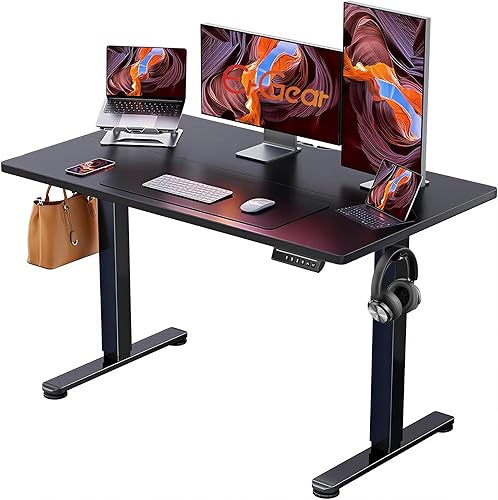
ErGear 48 X 24 Inch Height Adjustable: best overall
ErGear 48 X 24 Inch Height Adjustable: Best overall
- 48 x 24 in top
- 28.35 to 46.46 in height range
- 4 memory presets
- 176 lb capacity
A stable steel frame and simple presets make this the easiest first three-monitor standing desk to live with.
Pros
- Four memory presets
- Tested to 100,000 lift cycles
- Low-VOC materials
Cons
- 24 in depth is tight for three large monitors
The ErGear is the desk to buy first if you have three monitors but no fixed idea about the rest of the room. Its 47.2 x 23.6 in top fits two 27 in panels plus a center screen when the outer two angle inward, and the 28.35 to 46.46 in height range covers sitting and standing for most adults.
Four memory presets matter more than they sound on a three-screen desk. You set your sit height and your stand height once, then tap a button instead of holding a key while you watch the top move.
ErGear rates the frame for 176 lb and says it tested the lift 100,000 times, so the motor is built for daily use.
The trade-off is depth. At 23.6 in, a large curved center monitor sits close to your face unless you push it back and lose keyboard room.
If your center screen is 32 in or wider, pay the extra for the Grandder's 31.5 in top.
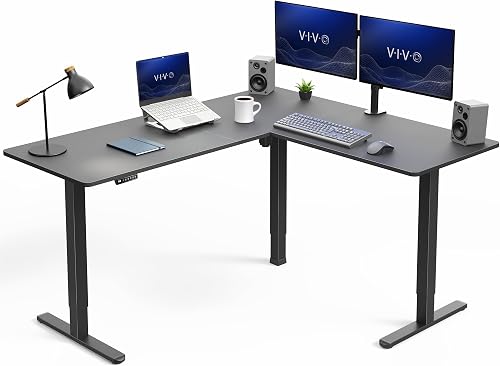
VIVO Electric Corner Standing Desk: best for corner rooms
VIVO Electric Corner Standing Desk: Best for corner rooms
- L-shape, 63 x 55.2 in outer surface
- 28.5 to 46.8 in height range
- 225 lb capacity
- Memory presets
The return wing wraps two walls and carries the third monitor away from the main row.
Pros
- Huge L-shaped surface
- 225 lb steel frame
- Reversible layout
Cons
- Takes up a whole corner
The VIVO corner desk is the pick when your office has a corner going spare and you want three monitors without lining them all up in one row. The L-shaped top measures 63 x 55.2 in on the outside, so the return wing holds the third screen at an angle while the main desk keeps the keyboard and mouse clear.
The 225 lb rating is the highest here, and the all-steel frame with 2.4 in wide legs is built to carry that load without shimmy. The height range runs 28.5 to 46.8 in, and the push-button controller saves your preferred heights.
Its size is the whole point and the whole cost. A 63 x 55.2 in L-shape needs two walls and a real corner, and it will not fit a narrow room or a spot beside a door.
If your corner is small, look at the OffiGo 63 in L-shape instead, which packs drawers into a tighter footprint.
Grandder 55x32 Extra-Deep Electric Standing Desk: best for deep and curved monitors
Grandder 55x32 Extra-Deep Electric Standing Desk: Best for deep and curved monitors
- 55 x 31.5 in top
- 28 to 45.6 in height range
- 2 memory presets
- Anti-collision
The extra 31.5 in depth puts a curved center screen at a sane viewing distance with room left for two side monitors.
Pros
- 31.5 in depth
- Anti-collision safety stop
- Under 45 dB lift
Cons
- Only two memory presets
The Grandder answers the one problem the other desks here leave open: depth. Its top is 55 x 31.5 in, which is 4 in deeper than a standard 55 in desk, and that extra reach puts a 49 in curved screen at a comfortable viewing distance with the keyboard still in front of it.
For three monitors, the depth helps in two ways. A curved center screen no longer crowds your hands, and the outer panels can sit slightly forward without hanging over the edge.
The 28 to 45.6 in height range covers both postures, and the anti-collision system stops the top if it meets an obstacle on the way down.
Two memory presets are enough for a sit height and a stand height, but not for a shared desk with two users. Grandder also splits its 55 in top into two joined panels.
That's normal at this size, and it means you should keep the seam in mind when you clamp a monitor arm.
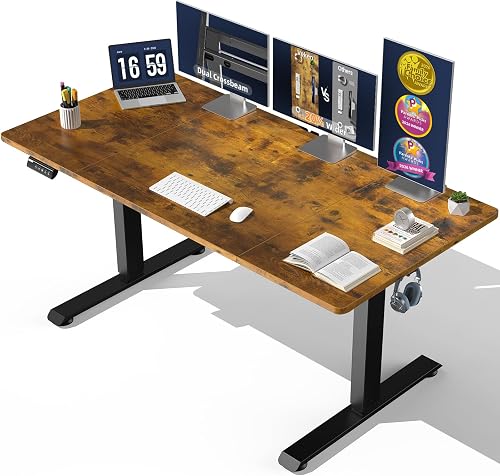
Veken 63"x28" Wider Large Standing Desk: best for long flat rows
Veken 63"x28" Wider Large Standing Desk: Best for long flat rows
- 63 x 28 in top
- 28.3 to 46.5 in height range
- Memory preset
- Dual-beam frame
The wide, joined top fits three flat monitors in a straight row without crowding the keyboard.
Pros
- 63 in width
- Dual-beam frame for less wobble
- Low-emission engineered wood
Cons
- Top arrives in joined pieces
- 28 in depth is shallow for big curved screens
The Veken suits a room with a long wall and three flat monitors that look best side by side. Its 63 x 28 in top gives you about 5 ft of width, enough for three 24 to 27 in panels in a straight row with the keyboard in front.
The dual-beam frame is the feature to note. Veken builds the legs and crossbars to cut wobble during height changes, and the 28.3 to 46.5 in motor runs quietly enough for a shared room.
A memory preset saves your stand height so you don't have to find it by feel.
The 28 in depth is the limit. Three flat panels are fine, but a large curved screen will sit close.
The top also arrives in joined pieces, so plan the seam position before you mount an arm. For a straight row of three screens on a long wall, this is the practical buy.
OffiGo 63 Inch L Shaped Electric Standing: best for storage and charging
OffiGo 63 Inch L Shaped Electric Standing: Best for storage and charging
- 63 in L-shape
- 29.9 to 46.1 in height range
- 4 fabric drawers
- 3 outlets, USB and USB-C
Drawers swallow cables, adapters and notebooks, and the built-in outlets keep three monitors on one corner.
Pros
- Four drawers
- Built-in power strip
- Reversible return
Cons
- Starts higher at 29.9 in
- L-shape eats corner space
The OffiGo 63 in L-shape is for the desk that has to be more than a surface. Its four fabric drawers take cables, adapters, notebooks and the small gear that otherwise lands on top of a three-monitor desk.
The return wing is reversible, so you can put the drawers on the left or right depending on your room.
Built-in power is the other reason to pick it. Three outlets plus one USB and one USB-C port sit on the desk, which means three monitors and a laptop can share one corner without a power strip on the floor.
The height range runs 29.9 to 46.1 in with three presets and a display for the current height.
The starting height is high. At 29.9 in, the lowest position may feel tall for shorter users sitting in a standard chair.
The L-shape also needs a corner. If you sit low or your corner is tight, the ErGear or the Veken fits better.
VIVO Electric Standing Desk: best for wide open rooms
VIVO Electric Standing Desk: Best for wide open rooms
- 71 x 29.5 in top
- 29.2 to 48.4 in height range
- 220 lb capacity
- 4 memory presets
The longest straight top here gives three big flat panels plenty of elbow room.
Pros
- 71 in width
- 220 lb frame
- Four memory presets
Cons
- Needs a long wall
- 29.5 in depth
The VIVO 71 in desk is the widest flat top here, and that width is its whole case. A 70.9 x 29.5 in surface holds three large panels in a row with room left for speakers or a second keyboard without anything hanging over the edge.
The frame is all steel and rated for 220 lb, close to the corner VIVO's 225 lb, and the motor runs 29.2 to 48.4 in. That top height is the highest range here, which helps taller users stand without a topper.
Four memory presets save both postures.
Its size is the trade-off. A 71 in top needs a long wall and about 6 ft of clear floor, and the 29.5 in depth leaves a curved center screen closer than you may like.
The top comes in three pieces. For a straight row in a big room, though, the extra width is hard to beat.
OffiGo 55 Inch U Shaped Electric Standing: best for dual monitors and gear
OffiGo 55 Inch U Shaped Electric Standing: Best for dual monitors and gear
- 55 in U-shape
- 28.3 to 46.5 in height range
- Monitor shelf
- 3 presets and outlets
A raised shelf and a pull-out keyboard tray suit two screens plus a laptop and streaming gear.
Pros
- Raised monitor shelf
- Keyboard tray
- Built-in outlets and USB
Cons
- 154 lb capacity
- Shelf depth limits three big panels
The OffiGo U-shaped desk fits two monitors and a laptop better than it fits three equal panels. Its raised monitor shelf holds two screens at eye level and frees the main surface for a keyboard tray and a third screen or laptop below.
The U-shape wraps around the sitter, and the pull-out keyboard tray keeps the keyboard at a comfortable reach while the shelf holds the displays. Built-in power covers three outlets and two USB ports.
The height range is 28.3 to 46.5 in with three presets, and the LED strip adds 10 colors and modes if you like that look.
The 154 lb rating is the lowest here, so keep the load light. The shelf depth also limits how wide a third monitor can be.
If your third screen is a large panel, a flat desk like the ErGear or the Veken is the better base.
WALKINGDESK 63 Inches Height Adjustable L Shaped: best for mixed gear and decor
WALKINGDESK 63 Inches Height Adjustable L Shaped: Best for mixed gear and decor
- 63 in L-shape
- 28.3 to 46.5 in height range
- Monitor shelf and 3 drawers
- 176 lb capacity
Drawers, a monitor shelf and a leather pouch give a three-screen corner a place for everything else.
Pros
- Six buttons with 4 presets
- Cable tray and cup holder
- Anti-collision
Cons
- Monitor shelf reduces flat desktop area
- Heavy at 51 kg
The WALKINGDESK L-shape suits a corner where the third monitor shares space with a console, a printer or decor. Its monitor shelf lifts the main screens while the drawers and storage cubby hold controllers, pens and headphones, and the leather pouch gives papers a home.
The height range runs 28.3 to 46.5 in on six buttons with four presets, so two people can save their own sit and stand heights. The anti-collision stop reverses the top if it meets something on the way down, and the frame is rated for 176 lb.
A cable tray, cup holder and headphone hook come in the box.
The monitor shelf is the trade-off. It raises two screens but takes flat surface away from a third wide panel.
At 51 kg the desk is heavy to move once built. It suits a corner that needs storage more than pure monitor width.
How these standing desks compare for three monitors
| Product | Best for | Desktop | Height range | Capacity | Our score |
|---|---|---|---|---|---|
| ErGear 48 X 24 Inch Height Adjustable | overall | 47.2 x 23.6 in | 28.35 to 46.46 in | 176 lb | 9.6 |
| VIVO Electric Corner Standing Desk | corner rooms | 63 x 55.2 in L-shape | 28.5 to 46.8 in | 225 lb | 9.5 |
| Grandder 55x32 Extra-Deep Electric Standing Desk | deep and curved monitors | 55 x 31.5 in | 28 to 45.6 in | 176 lb | 9.4 |
| Veken 63"x28" Wider Large Standing Desk | long flat rows | 63 x 28 in | 28.3 to 46.5 in | Dual-beam steel frame | 9.2 |
| OffiGo 63 Inch L Shaped Electric Standing | storage and charging | 63 in L-shape | 29.9 to 46.1 in | Steel frame | 9.1 |
| VIVO Electric Standing Desk | wide open rooms | 70.9 x 29.5 in | 29.2 to 48.4 in | 220 lb | 9.0 |
| OffiGo 55 Inch U Shaped Electric Standing | dual monitors and gear | 55 in U-shape | 28.3 to 46.5 in | 154 lb | 8.9 |
| WALKINGDESK 63 Inches Height Adjustable L Shaped | mixed gear and decor | 63 in L-shape | 28.3 to 46.5 in | 176 lb | 8.8 |
The comparison table sorts the picks by the numbers that matter for three screens: desktop width and depth, height range, load rating and the preset count. Read down the width column first, then the depth column if you use a curved center monitor.
A desk that is wide but shallow can still crowd a 49 in screen.
Load rating matters most when you plan to add monitor arms. An arm clamps to the top and pushes the weight onto one spot, so a higher rating leaves more headroom.
The ErGear at 176 lb and the VIVO models at 220 to 225 lb handle arms better than the 154 lb OffiGo U-shape.
Preset count matters for shared desks. Four presets let two people each save a sit and a stand height.
Two presets suit one user with a fixed pair of postures. The L-shaped desks here split the difference with three or four.
How we compared these desks
We compared the eight desks by matching their specs to what a three-monitor setup needs. That means desktop width and depth first, then height range, load rating and the stability features a maker describes.
Every desk here had to offer a real way to fit three screens, either by width, depth or an L-shaped wing.
We also weighed the extras that change daily use: preset count, cable management, built-in power and monitor shelves. A shelf helps two screens but can work against three wide panels, so we scored it by the setup it fits.
The score weighs specs and features against what a three-monitor buyer is shopping for, and the picks run highest first.
What desktop size fits three monitors on a standing desk?
A 60 to 72 in wide top with at least 28 in of depth fits three monitors in a row, and 48 in works when the outer two angle inward. Measure your monitor bezels edge to edge, then add 2 to 4 in between each screen for a finger's gap and a little airflow.
Straight tops in this group
The ErGear at 47.2 in is the narrowest straight top here, and it needs the angled layout. The Veken at 63 in and the VIVO at 70.9 in hold three panels in a row with room to spare.
Depth runs 23.6 in on the ErGear, 28 in on the Veken, 29.5 in on the VIVO and 31.5 in on the Grandder.
L-shaped and U-shaped tops
The L-shaped desks put the third screen on the return wing, which frees the main row for two panels and the keyboard. The U-shaped OffiGo uses a raised shelf instead, which suits two big monitors plus a laptop more than three equal panels.
How much depth do you need for curved or ultrawide monitors?
A curved or ultrawide center screen needs about 31.5 in of depth, so the Grandder is the pick if your middle monitor is large. Depth is the dimension buyers most often get wrong on a three-screen desk, because width gets the attention while depth decides whether your eyes and hands stay comfortable.
When 24 to 28 in depth is enough
Three flat 24 to 27 in panels fit fine on 24 to 28 in of depth when the outer two angle inward. The ErGear, Veken and VIVO straight desks all fall in this range.
The center screen sits a bit closer, so keep the keyboard near the front edge.
When to choose 31.5 in depth
Pick the Grandder when your center screen is curved or 32 in and wider. The extra depth pushes the screen back to a comfortable viewing distance without eating your keyboard room.
If you already own a deep monitor and a shallow desk, a monitor arm is the cheaper fix, but it moves the load onto one clamp point.
Should you choose a straight, L-shaped or U-shaped top?
Choose a straight top for a long wall and a simple row, an L-shape for a corner and a third screen off to the side, and a U-shape for two monitors plus a laptop and gear. The shape decides how much floor the desk needs before any monitor goes on it.
Straight desks for a long wall
A straight desk is the easier setup for three flat panels. It gives a clean row at one height and leaves the floor under it clear.
It needs a long wall and a room where you don't mind the desk running 63 to 71 in wide. The Veken and VIVO straight models are the best fits here.
L-shaped desks for a corner
An L-shape uses a corner that would otherwise go empty, and the return wing holds the third screen or a printer. The trade-off is floor space: an L-shape needs two walls and a real corner.
The VIVO corner model has the largest surface, and the OffiGo 63 in has the most storage.
U-shaped desks for a wrap-around feel
A U-shape wraps the sitter on three sides, which suits a gamer or a streamer with two monitors and a laptop. It is the least flexible for three equal panels because the raised shelf takes flat area away.
Pick the OffiGo U-shape only if two screens plus a laptop is your real layout.
How do you stop a three-monitor standing desk from wobbling?
Put the desk on a hard, level floor and tighten every leg bolt after assembly, then raise it to your stand height and check the top for side-to-side play. A steel frame rated for the load does most of the work, but setup decides the rest.
Setup checks before you blame the desk
Three monitors put more weight high up, so wobble shows more on a three-screen desk than on a laptop desk. Set the desk on hardwood or tile where you can, and use the leveling feet on uneven floors.
Check the leg bolts after the first week and again after a month.
Fixes if the wobble stays
If the desk still rocks at standing height, our how to fix a wobbly desk guide covers the usual causes, from loose bolts to carpet and an uneven floor. A thick rug under a two-leg desk is the most common culprit.
A mat or a hard floor is the quick fix.
How should you handle cables on a three-monitor standing desk?
Route the monitor cables down one leg and leave slack for the full height range, then bundle them with clips so nothing catches when the top moves. Three monitors mean three video cables, three power cords and possibly a hub, so plan the route before you plug anything in.
Plan the route before assembly
Decide where the tower or laptop sits before you build the desk. A desk with built-in power, like the OffiGo models, cuts the cords that have to reach the floor.
A cable tray under the top keeps the bundle off your knees.
Keep slack for the lift
Leave a loop of slack at the top of each cable so the desk can rise without pulling a plug loose. Tie the bundle to one leg with clips and check it at both the sit and stand heights.
Our computer desk cable management guide has a step-by-step route for a multi-monitor desk.
Which standing desk should you buy for three monitors?
Buy the ErGear 48 X 24 Inch Height Adjustable for most three-monitor setups, because its stable frame, four presets and 176 lb rating cover daily sit-stand use without asking for a big room. Then match the rest to your screens and space.
Here's the decision rule. Pick the Grandder if your center monitor is curved or wide and you need depth.
Pick the VIVO corner or the OffiGo 63 in L-shape if you have a corner and want the third screen or storage off the main row. Pick the Veken or the VIVO 71 in for a long wall and three flat panels.
Pick the OffiGo U-shape only for two monitors plus a laptop.
If you want more options across budget tiers and frame styles, our electric standing desk for home office roundup covers the wider market. Set your monitor width first, then your depth, then the frame.
That order gets you the right adjustable standing desk for 3 monitors without buying twice.
Our top 3 picks at a glance
-
1
-
2
-
3
Best for deep and curved monitors
Grandder 55x32 Extra-Deep Electric Standing Desk
9.4/10 our score
See it on Amazon
Frequently asked questions
How wide does a desk need to be for three monitors?
Plan for about 60 to 72 in of width when three monitors sit in one row. Two 27 in panels plus a center screen need roughly 60 in of clear top before gaps.
A 48 in desk works when the outer two screens angle inward.
Can a 24 in deep desk hold three monitors?
Yes, if the outer two screens turn inward and the center screen sits close to the wall. Depth matters most for curved or ultrawide panels.
A 31.5 in deep top keeps a large curved monitor at a comfortable distance with the keyboard in front.
Does an L-shaped desk help with three monitors?
It can. The return wing holds a third screen or a laptop off to the side, so the main row stays clear for the keyboard.
An L-shape also uses a corner that would otherwise go empty.
The trade-off is floor space and a less flexible layout.
Will a standing desk wobble with three monitors?
A steel frame rated for the load and set up on level floor stays steadier than a light frame. Keep the desk off thick carpet and tighten the leg bolts after assembly.
If the desk still rocks, our fix for a wobbly desk covers the usual causes.
Do I need a monitor arm on a standing desk?
Not always. A top 63 in wide or 31.5 in deep holds three panels without arms.
An arm frees desktop space but adds load to the frame.
Check the desk's weight rating and the arm's clamp depth before adding one.
How much weight do three monitors add to a desk?
Three 27 in monitors typically weigh under 40 lb together, and a laptop or tower adds more. Every desk here is rated well above that.
The load matters more for monitor arms, which push weight onto one clamped point.